KubeezCut: Free Open-Source Video Editor That Runs in Your Browser
KubeezCut is a free, open-source, client-side video editor with multi-track timelines, GPU-accelerated effects, keyframe animation, local AI transcription, and in-browser export. No installation, no uploads, no account.

Not everyone needs a subscription to edit video. KubeezCut is a free, open-source video editor that runs entirely in your browser — no installation, no uploads, no account required. Everything is processed locally on your machine.
Try KubeezCut at editor.kubeez.com
#What Is KubeezCut?
KubeezCut is a fully client-side, multi-track video editing application built on React 19 and TypeScript. It runs in Chrome or Edge 113+ using modern browser APIs — WebGPU, WebCodecs, and the File System Access API. Your files never leave your device.
The project is open-source on GitHub and free to use with no restrictions.
#Multi-Track Timeline
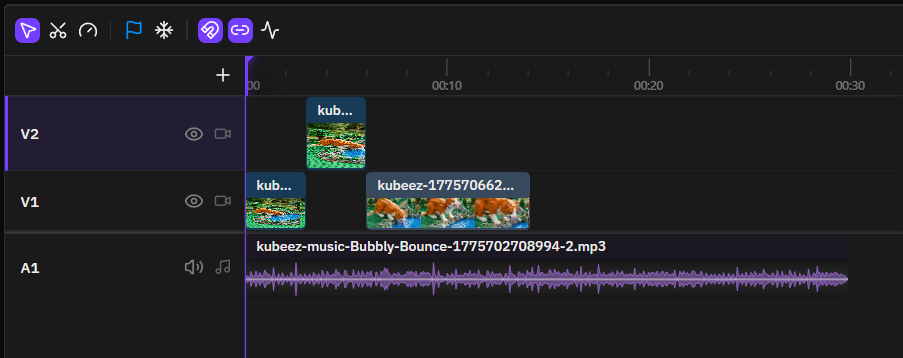
The timeline supports multiple synchronized tracks: video, audio, text, images, and shapes. Advanced editing tools are built in — ripple delete, rolling edits, rate stretching, and track grouping. Frame-accurate rendering is handled by a custom Clock engine.
#GPU-Accelerated Effects
KubeezCut uses WebGPU compute shaders for hardware-accelerated visual effects. Over 40 effects are included:
- Blur: Gaussian, motion, radial, zoom blur
- Color correction: Brightness, curves, hue shift, temperature/tint
- Distortion: Pixelate, twirl, wave, kaleidoscope
- Keying: Chroma key with spill suppression
- Transitions: Dissolve, glitch, light leak, wipe, 3D flip
- Blend modes: 25 compositing modes
All effects run on the GPU, so performance stays smooth even on longer timelines.
#Keyframe Animation
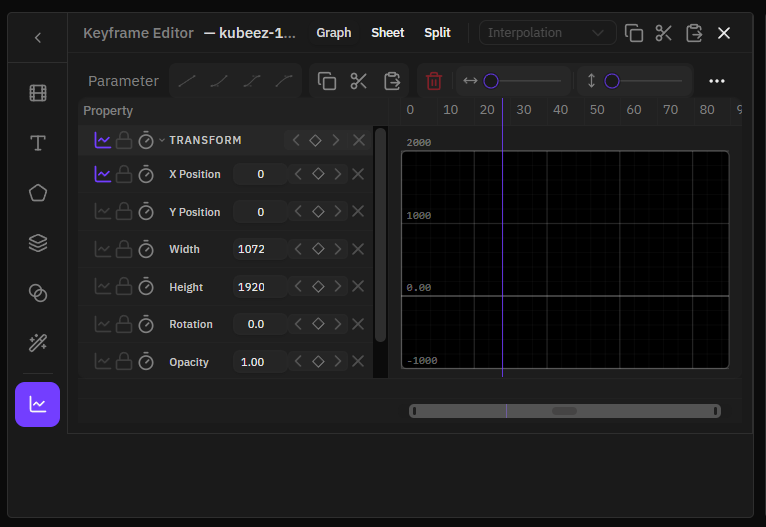
Animate any property over time with a full keyframe editor. Features include:
- Bezier curve editing with easing presets — linear, ease-in, ease-out, spring
- Graph editor for precise curve control
- Dopesheet view and split view visualization
#AI Features — Running Locally
KubeezCut includes two AI tools that run entirely in the browser using WebGPU. No API keys, no server, no data sent anywhere.
Local speech-to-text: Powered by Whisper (Tiny through Large v3 Turbo), transcription happens on your device. Use it to generate captions and subtitles from your audio automatically.
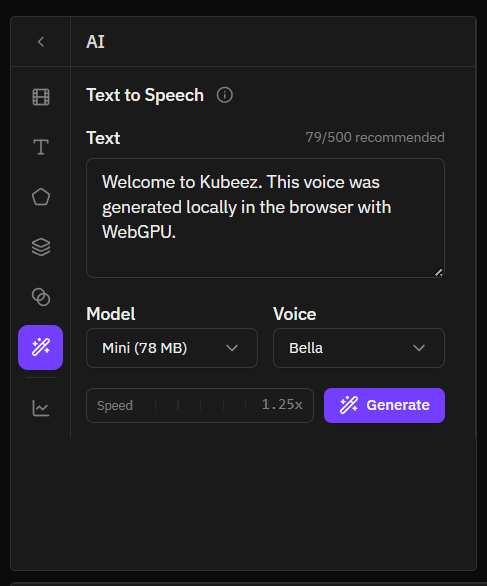
Local text-to-speech: Generate voiceovers from a script directly in the browser. Type your text, select a voice, and render the audio without leaving the editor.
#Export Without Compromise
Video encoding uses the browser's native WebCodecs API — everything happens in-browser, with no server-side rendering. Supported output:
- Formats: MP4, WebM, MOV, MKV
- Codecs: H.264, H.265, VP8, VP9, AV1
- Bitrate: 2–20 Mbps
The final video is encoded and downloaded directly — no wait times, no upload queues.
#Project Management and Autosave
Projects are saved automatically using IndexedDB. You can also export your project as a ZIP file to back it up or share it, and re-import it later to continue editing.
#Why It's Free and Open Source
KubeezCut is the privacy-first, free editing layer in the Kubeez ecosystem. It handles everything you need to assemble and polish your video — on your device, at no cost.
If you need AI-generated video clips, images, or music to add into your timeline, Kubeez has those tools. KubeezCut and Kubeez are designed to work together: generate assets on Kubeez, edit them in KubeezCut.
The source code is available on GitHub. Contributions and feedback are welcome.
#Requirements
- Browser: Chrome or Edge 113+
- Required APIs: WebGPU, WebCodecs, OPFS, File System Access API
- No account, no subscription, no file upload
Open KubeezCut and start editing — free, forever.
See also