'%3e%3c/path%3e%3cpath%20d='M18.588%2010.164a23.188%2023.188%200%2001-1.999%204.455c-3.17%205.492-7.795%208.758-10.33%207.294%205.703%203.293%2013.143%201.082%2016.619-4.938a13.392%2013.392%200%20001.037-2.255c.259-.738-.092-1.534-.77-1.925l-4.557-2.63z'%20fill='url(%23lobe-icons-kling-1-_R_0_)'%3e%3c/path%3e%3cpath%20d='M16.59%2014.62c3.17-5.492%203.686-11.13%201.15-12.594C15.207.563%2010.582%203.83%207.41%209.32c2.074-3.59%205.809-5.315%208.344-3.852%202.534%201.464%202.908%205.56.835%209.151z'%20fill='url(%23lobe-icons-kling-2-_R_0_)'%3e%3c/path%3e%3cpath%20d='M7.41%209.32c-3.17%205.492-3.686%2011.13-1.15%2012.593%202.534%201.464%207.159-1.802%2010.33-7.294-2.074%203.591-5.809%205.316-8.344%203.852-2.534-1.463-2.908-5.56-.835-9.15z'%20fill='url(%23lobe-icons-kling-3-_R_0_)'%3e%3c/path%3e%3cdefs%3e%3cradialGradient%20cx='0'%20cy='0'%20gradientTransform='matrix(7.47772%20-12.51022%2017.14368%2010.24728%205.173%2013.637)'%20gradientUnits='userSpaceOnUse'%20id='lobe-icons-kling-0-_R_0_'%20r='1'%3e%3cstop%20offset='.095'%20stop-color='%23FFF959'%3e%3c/stop%3e%3cstop%20offset='.326'%20stop-color='%230DF35E'%3e%3c/stop%3e%3cstop%20offset='.64'%20stop-color='%230BF2F9'%3e%3c/stop%3e%3cstop%20offset='1'%20stop-color='%2304A6F0'%3e%3c/stop%3e%3c/radialGradient%3e%3cradialGradient%20cx='0'%20cy='0'%20gradientTransform='rotate(120.868%206.491%2010.491)%20scale(14.5747%2019.9728)'%20gradientUnits='userSpaceOnUse'%20id='lobe-icons-kling-1-_R_0_'%20r='1'%3e%3cstop%20offset='.095'%20stop-color='%23FFF959'%3e%3c/stop%3e%3cstop%20offset='.326'%20stop-color='%230DF35E'%3e%3c/stop%3e%3cstop%20offset='.64'%20stop-color='%230BF2F9'%3e%3c/stop%3e%3cstop%20offset='1'%20stop-color='%2304A6F0'%3e%3c/stop%3e%3c/radialGradient%3e%3clinearGradient%20gradientUnits='userSpaceOnUse'%20id='lobe-icons-kling-2-_R_0_'%20x1='15.578'%20x2='18.062'%20y1='1.798'%20y2='9.861'%3e%3cstop%20stop-color='%23003EFF'%3e%3c/stop%3e%3cstop%20offset='1'%20stop-color='%230BFFE7'%3e%3c/stop%3e%3c/linearGradient%3e%3clinearGradient%20gradientUnits='userSpaceOnUse'%20id='lobe-icons-kling-3-_R_0_'%20x1='8.422'%20x2='5.938'%20y1='22.142'%20y2='14.079'%3e%3cstop%20stop-color='%23003EFF'%3e%3c/stop%3e%3cstop%20offset='1'%20stop-color='%230BFFE7'%3e%3c/stop%3e%3c/linearGradient%3e%3c/defs%3e%3c/svg%3e)
Kling video models on Kubeez
Seven Kling cards for four jobs: generate from text or a still, bridge two frames, transfer movement, or restyle your footage.
The lineup
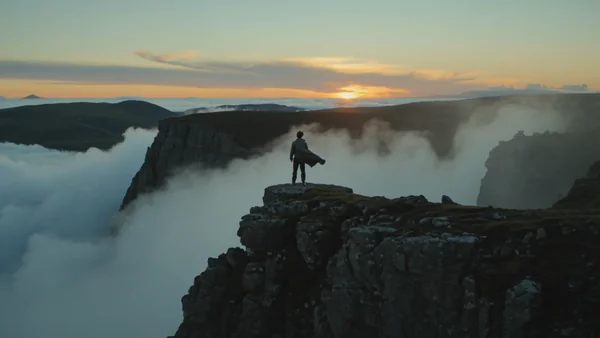
Prompt: Slow cinematic push-in on a lone traveler in a grey coat standing at the edge of an Icelandic cliff at dawn, anamorphic lens, volumetric fog rolling through the frame, teal-orange color grade, subtle wind catching the fabric of the coat, epic scale, 16:9 cinematic.
- 16:9
- 5s
- 720p
Prompt: cinematic, dramatic shot of a master sushi chef demonstrating exceptional, precise skill while cutting fresh tuna, sharp cinematic lighting, close-up of hands and knife with fresh fish, professional sushi kitchen setting, smooth camera movement, high quality vertical video
- 9:16
- 15s
- 1080p
- 16:9
- 5s
- 720p
Kling 3.0
The full generator: multi-shot, @elements and up to 4K.
Multi-shot is unique to Kling 3.0: write up to five shots, each with its own prompt and 1 to 12 seconds, and get the sequence in one 3 to 15 second render. Saved @elements keep a subject consistent.
Best for
- Multi-cut sequences in one render
- Recurring characters held steady with @elements
- Hero shots delivered in 4K
Pick another model for
- Restyling footage you shot. Use Omni Transform.
- Quick single drafts. Turbo returns sooner.
Specs
- Inputs
- Prompt, start frame, optional end frame
- Length
- 3 to 15 seconds
- Multi-shot
- Up to 5 shots, 1 image
- Tiers
- Standard, Pro, 4K
- Aspect ratio
- 16:9, 9:16, 1:1
- Audio
- Switchable, always on at 4K
See pricesHide prices
Price
| Option | Rate | Unit |
|---|---|---|
| Standard | 17 | credits / sec |
| Standard, with audio | 23 | credits / sec |
| Pro | 21 | credits / sec |
| Pro, with audio | 30 | credits / sec |
| 4K | 71 | credits / sec |
Prompt: morph the first image into the second
- 16:9
- 5s
- 720p
Kling 3.0 Omni
Works only from what you attach. No text to video.
Three lanes. Transform restyles your 3 to 15 second clip and keeps its camera, blocking and timing. Frames animates between exactly two stills. References builds a new shot from up to seven stills or a clip.
Best for
- Moving a filmed take into another style
- Look variants of one approved shoot
- New shots matching reference stills
Pick another model for
- Prompt-only video. Omni needs an attachment.
- Clips over 15 seconds. Trim them first.
Specs
- Source clips
- MP4 or MOV, max 200 MB
- Transform
- 1 clip, 3 to 15 seconds
- Frames
- Exactly 2 stills, first then last
- References
- 7 stills, or clip plus 4
- Resolution
- 720p, 1080p, 4K
- Audio
- Switchable, off with References clip
See pricesHide prices
Price
| Option | Rate | Unit |
|---|---|---|
| Transform, 720p | 27 | credits / sec |
| Transform, 1080p | 36.5 | credits / sec |
| Transform, 4K | 90.5 | credits / sec |
| Frames, 720p | 19 | credits / sec |
| Frames, 720p, with audio | 24.5 | credits / sec |
| Frames, 1080p | 24.5 | credits / sec |
| Frames, 1080p, with audio | 31.5 | credits / sec |
| Frames, 4K | 90.5 | credits / sec |
| Frames, 4K, with audio | 90.5 | credits / sec |
| References, 720p | 19 | credits / sec |
| References, 720p, with audio | 24.5 | credits / sec |
| References, 720p, with video | 27 | credits / sec |
| References, 1080p | 24.5 | credits / sec |
| References, 1080p, with audio | 31.5 | credits / sec |
| References, 1080p, with video | 36.5 | credits / sec |
| References, 4K | 90.5 | credits / sec |
| References, 4K, with audio | 90.5 | credits / sec |
| References, 4K, with video | 90.5 | credits / sec |
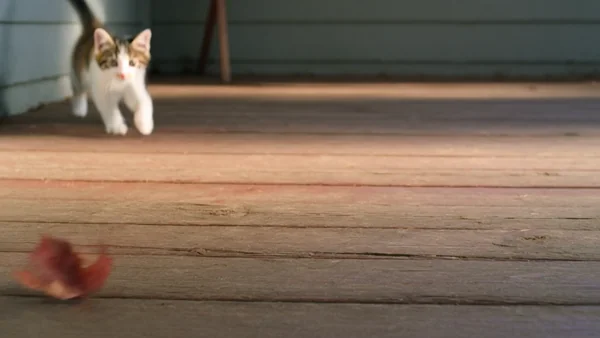
Prompt: A calico kitten playfully chasing a red autumn leaf across a sunlit wooden porch, gentle camera push-in, warm afternoon light, photorealistic, smooth natural motion.
- 16:9
- 3s
- 720p
Prompt: The neon koi fish swims gracefully through the air, its body undulating like it's in water, leaving a glowing trail of light. Neon signs flicker in the background. High-quality cinematic motion.
- 16:9
- 10s
- 720p
Kling 3.0 Turbo
Kling 3.0 cut down for faster single shots.
Turbo keeps what most single shots need: 3 to 15 seconds, three aspect ratios, 720p or 1080p, from a prompt or one start frame. No end frame, multi-shot, @elements or audio switch; sound is always on.
Best for
- Iterating a prompt across quick drafts
- Vertical 1080p clips from one still
Pick another model for
- Silent output. Audio cannot be switched off.
- Multi-shot, @elements or 4K. Use Kling 3.0.
Specs
- Modes
- Text to video, image to video
- Image input
- 1 start frame
- Length
- 3 to 15 seconds
- Resolution
- 720p, 1080p
- Aspect ratio
- 16:9, 9:16, 1:1
- Audio
- Always on, no switch
See pricesHide prices
Price
| Option | Rate | Unit |
|---|---|---|
| 720p | 23 | credits / sec |
| 1080p | 29 | credits / sec |
- 9:16
- 11s
- 720p
Kling 3.0 Motion Control
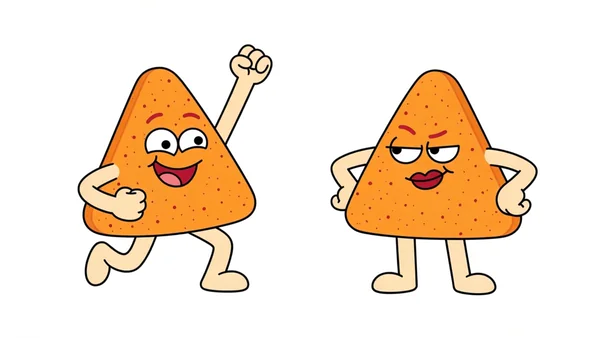
Your character performs a reference clip's movement, keeping its sound.
Attach a character still, then a clip of someone moving. Your character performs that movement at the clip's timing, and the 3.0 version keeps the clip's original sound, which matters for dances and spoken lines.
Best for
- Dances performed by an illustrated character
- Mascots acting out a recorded move
- Keeping a clip's beat and audio
Pick another model for
- Restyling the original performer. Use Omni Transform.
- Inventing motion from text. Use Kling 3.0 or Turbo.
Specs
- Inputs
- 1 still, then 1 clip
- Video orientation
- Clips of 3 to 30 seconds
- Image orientation
- Clips up to 10 seconds
- Output length
- Same as the clip
- Resolution
- 720p, 1080p on Motion Pro
- Audio
- Keeps the clip's original sound
See pricesHide prices
Price
| Option | Rate | Unit |
|---|---|---|
| 720p | 20 | credits / sec |
| 1080p | 28 | credits / sec |
- 16:9
- 10s
- 1080p
Kling 2.6
Fixed 5 or 10 second clips with switchable sound.
The plain generator: a prompt or one still in, a 5 or 10 second clip out, picture and sound in one pass. Switch sound off for a silent clip you will score in the edit.
Best for
- 5 or 10 second social shots
- Bringing one still to life
- Silent b-roll to score later
Pick another model for
- Any length other than 5 or 10 seconds
- Copying movement from a clip. Use Kling 2.6 Motion.
Specs
- Modes
- Text to video, image to video
- Image input
- 1 still
- Length
- 5 or 10 seconds
- Aspect ratio
- 16:9, 9:16, 1:1
- Audio
- On or off
- Billing
- Per clip
See pricesHide prices
Price
| Option | Rate | Unit |
|---|---|---|
| Text to video, 5 s | 90 | credits |
| Text to video, 5 s, with audio | 175 | credits |
| Text to video, 10 s | 175 | credits |
| Text to video, 10 s, with audio | 310 | credits |
| Image to video, 5 s | 90 | credits |
| Image to video, 5 s, with audio | 175 | credits |
| Image to video, 10 s | 175 | credits |
| Image to video, 10 s, with audio | 310 | credits |
Prompt: A tiny golden kitten dances on the empty night street, staying small in the wide frame, real kitten size against the big road, never growing to human scale. The camera slowly pushes in toward it and drifts gently to the left like a handheld phone, keeping the whole kitten in frame from head to paws. Fur and little arms move naturally with the dance, night street lights and parked cars blurred behind.
- 9:16
- 7s
- 720p
Kling 2.6 Motion Control
Still plus motion clip on the 2.6 model, for tests.
The same still plus clip workflow as 3.0 Motion, with no sound setting. Use it for motion studies: finding the reference clip that reads best or trying several characters on one choreography.
Best for
- Motion tests across many takes
- Choosing between reference clips
- Character prototypes for games or animation
Pick another model for
- Final takes on the newest model. Use 3.0 Motion.
- Restyling the original performer. Use Omni Transform.
Specs
- Inputs
- 1 still, then 1 clip
- Video orientation
- Clips of 3 to 30 seconds
- Image orientation
- Clips up to 10 seconds
- Output length
- Same as the clip
- Resolution
- 720p, 1080p on Motion Pro
- Audio
- No sound setting
See pricesHide prices
Price
| Option | Rate | Unit |
|---|---|---|
| 720p | 13 | credits / sec |
| 1080p | 23 | credits / sec |
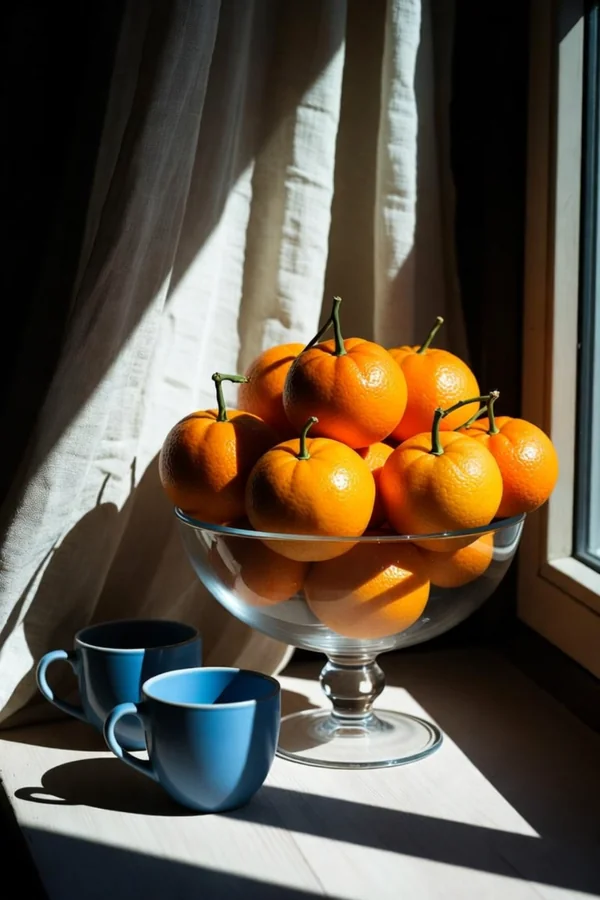
Prompt: The linen curtain sways in a soft breeze, morning sunlight slowly shifts across the oranges and blue cups, a few dust motes drift through the light
- 5s
Kling 2.5
Two stills in, the motion between them out.
Supply exactly two stills, first frame then last, for a 5 or 10 second transition. It is the only Kling card with a negative prompt, for listing what must not appear, and a CFG scale.
Best for
- Before and after product reveals
- Morphs between two designed keyframes
- Transitions with an exclusion list
Pick another model for
- Prompt-only video. It always needs both stills.
- Any length besides 5 or 10 seconds
Specs
- Input
- Exactly 2 stills, first then last
- Length
- 5 or 10 seconds
- Negative prompt
- Yes
- CFG scale
- 0 to 1, default 0.5
- Aspect ratio
- No setting
- Billing
- Per clip
See pricesHide prices
Price
| Option | Rate | Unit |
|---|---|---|
| 5 s | 65 | credits |
| 10 s | 125 | credits |
Kling models side by side
| Model | Job | What you attach | Length | Quality | Audio |
|---|---|---|---|---|---|
 Kling 3.0 Kling 3.0 | Generate, multi-shot | Prompt or frames | 3 to 15 s | Standard, Pro, 4K | Switch, on at 4K |
 Kling 3.0 Omni Kling 3.0 Omni | Restyle, bridge, reference | Clip or stills | Clip length or chosen | 720p, 1080p, 4K | Switch |
 Kling 3.0 Turbo Kling 3.0 Turbo | Fast single shots | Prompt or 1 frame | 3 to 15 s | 720p, 1080p | Always on |
 Kling 3.0 Motion Control Kling 3.0 Motion Control | Motion transfer | Still, then clip | Clip, max 30 s | 720p, 1080p | Keeps clip's sound |
 Kling 2.6 Kling 2.6 | Generate | Prompt or 1 still | 5 or 10 s | One tier | Switch |
 Kling 2.6 Motion Control Kling 2.6 Motion Control | Motion transfer | Still, then clip | Clip, max 30 s | 720p, 1080p | No setting |
 Kling 2.5 Kling 2.5 | Bridge two frames | Exactly 2 stills | 5 or 10 s | One tier | No setting |
Which Kling should I use?
Several cuts in one render
Kling 3.0
Multi-shot takes up to five shots, each with its own prompt.
Quick drafts from a prompt
Kling 3.0 Turbo
The fast Kling 3.0 lane, nothing extra to configure.
Restyle footage I already shot
Kling 3.0 Omni
Transform keeps your camera, blocking and timing, and changes the look.
Bridge two frames in 4K
Kling 3.0 Omni
Frames takes exactly two stills, up to 4K.
My character performing a real dance
Kling 3.0 Motion Control
Your still, the clip's movement and the clip's sound.
Motion tests before the final take
Kling 2.6 Motion Control
The same still plus clip workflow on 2.6, before the 3.0 render.
A standard 5 or 10 second clip
Kling 2.6
Two fixed lengths, sound you can switch off.
Bridge frames with a negative prompt
Kling 2.5
The only Kling card with a negative prompt.
How the family fits together
The line splits by job first. Kling 2.5, 2.6, 3.0 and Turbo generate new clips. The two Motion Control cards put your character into a reference clip's movement. Omni works only from footage or stills you attach. Kling 3.0 adds any length, 4K, multi-shot and @elements.
Getting the most out of Kling
- Bridging two frames: 2.5 for negative prompts, 3.0 for chosen length and ratio, Omni Frames for 4K.
- File order matters: still before clip on Motion Control, first frame before last on 2.5 and Omni Frames.
- Need silence? Turbo always includes audio, so use Kling 3.0 Standard or Pro with sound off.
Pick a plan
One credit balance covers images, video and audio. Pick the size that fits how much you make.
Studio Pro
Studio value with extra headroom.

2 seats included
What you'll generate
- Images~1,600
- Songs~492
- Videos~640
- Separations~1,066
- Caption Minutes~213
- All modelsIncluded
Starter
Low tier generations for regular use.
What you'll generate
- Images~275
- Songs~84
- Videos~110
- Separations~183
- Caption Minutes~36
- All modelsIncluded
Pro
Access full experience.
What you'll generate
- Images~650
- Songs~200
- Videos~260
- Separations~433
- Caption Minutes~86
- All modelsIncluded
Powerhouse
Most cost efficient.
13,000 credits/mo
Extra seats €19/seat/mo
What you'll generate
- Images~3,250
- Songs~1,000
- Videos~1,300
- Separations~2,166
- Caption Minutes~433
- All modelsIncluded
Enterprise
For teams that outgrow standard plans.
Pricing tailored to your team
What's included
- Custom number of seats
- Custom credit volume
- Invoice billing
- Priority support
Starter
Low tier generations for regular use.
What you'll generate
- Images~275
- Songs~84
- Videos~110
- Separations~183
- Caption Minutes~36
- All modelsIncluded
Pro
Access full experience.
What you'll generate
- Images~650
- Songs~200
- Videos~260
- Separations~433
- Caption Minutes~86
- All modelsIncluded
Studio Pro
Studio value with extra headroom.
2 seats included
What you'll generate
- Images~1,600
- Songs~492
- Videos~640
- Separations~1,066
- Caption Minutes~213
- All modelsIncluded
Powerhouse
Most cost efficient.
13,000 credits/mo
Extra seats €19/seat/mo
What you'll generate
- Images~3,250
- Songs~1,000
- Videos~1,300
- Separations~2,166
- Caption Minutes~433
- All modelsIncluded
Enterprise
For teams that outgrow standard plans.
Pricing tailored to your team
What's included
- Custom number of seats
- Custom credit volume
- Invoice billing
- Priority support
Test any model with one-time credit packs
Credits never expire and don't require a subscription — buy a pack, generate, see if Kubeez fits.
Quick refill
Quick refill for short bursts of generation.
Credits
500
You pay
€6
Standard pack
Mid-size pack at the standard per-credit rate.
Credits
1,500
You pay
€18
Volume pack
Larger pack with a volume discount built in.
Credits
5,000
You pay
€60€57
Production pack
Best per-credit price for sustained production.
Credits
15,000
You pay
€180€162
Frequently asked questions
Motion Control keeps the movement of your reference clip and swaps in the character from your still. Omni Transform keeps the clip itself, camera, blocking and performer, and changes the look.
Both Motion Control cards follow your reference clip, up to 30 seconds with Video orientation. Kling 3.0, Turbo and Omni reach 15 seconds. Kling 2.5 and 2.6 stop at 10.
Kling 2.6, 3.0 Standard and Pro, and Omni have a switch. Kling 3.0 4K and Turbo always include audio. Kling 3.0 Motion keeps the clip's sound. Kling 2.5 and 2.6 Motion have none.
On Kling 3.0, save up to three @elements, each from 2 to 4 images, and call one by name. On Omni, attach the stills to References. On Motion Control, it comes from your still.
Kling 3.0, Turbo, Omni and both Motion cards bill per second of the result, which for Motion Control and Omni Transform is the clip's length. Kling 2.5 and 2.6 bill per clip.
Open Kling in the studio
Pick the model that fits your job, write your prompt and run it.