'%3e%3c/path%3e%3cpath%20d='M20.616%2010.835a14.147%2014.147%200%2001-4.45-3.001%2014.111%2014.111%200%2001-3.678-6.452.503.503%200%2000-.975%200%2014.134%2014.134%200%2001-3.679%206.452%2014.155%2014.155%200%2001-4.45%203.001c-.65.28-1.318.505-2.002.678a.502.502%200%20000%20.975c.684.172%201.35.397%202.002.677a14.147%2014.147%200%20014.45%203.001%2014.112%2014.112%200%20013.679%206.453.502.502%200%2000.975%200c.172-.685.397-1.351.677-2.003a14.145%2014.145%200%20013.001-4.45%2014.113%2014.113%200%20016.453-3.678.503.503%200%20000-.975%2013.245%2013.245%200%2001-2.003-.678z'%20fill='url(%23lobe-icons-gemini-1-_R_0_)'%3e%3c/path%3e%3cpath%20d='M20.616%2010.835a14.147%2014.147%200%2001-4.45-3.001%2014.111%2014.111%200%2001-3.678-6.452.503.503%200%2000-.975%200%2014.134%2014.134%200%2001-3.679%206.452%2014.155%2014.155%200%2001-4.45%203.001c-.65.28-1.318.505-2.002.678a.502.502%200%20000%20.975c.684.172%201.35.397%202.002.677a14.147%2014.147%200%20014.45%203.001%2014.112%2014.112%200%20013.679%206.453.502.502%200%2000.975%200c.172-.685.397-1.351.677-2.003a14.145%2014.145%200%20013.001-4.45%2014.113%2014.113%200%20016.453-3.678.503.503%200%20000-.975%2013.245%2013.245%200%2001-2.003-.678z'%20fill='url(%23lobe-icons-gemini-2-_R_0_)'%3e%3c/path%3e%3cdefs%3e%3clinearGradient%20gradientUnits='userSpaceOnUse'%20id='lobe-icons-gemini-0-_R_0_'%20x1='7'%20x2='11'%20y1='15.5'%20y2='12'%3e%3cstop%20stop-color='%2308B962'%3e%3c/stop%3e%3cstop%20offset='1'%20stop-color='%2308B962'%20stop-opacity='0'%3e%3c/stop%3e%3c/linearGradient%3e%3clinearGradient%20gradientUnits='userSpaceOnUse'%20id='lobe-icons-gemini-1-_R_0_'%20x1='8'%20x2='11.5'%20y1='5.5'%20y2='11'%3e%3cstop%20stop-color='%23F94543'%3e%3c/stop%3e%3cstop%20offset='1'%20stop-color='%23F94543'%20stop-opacity='0'%3e%3c/stop%3e%3c/linearGradient%3e%3clinearGradient%20gradientUnits='userSpaceOnUse'%20id='lobe-icons-gemini-2-_R_0_'%20x1='3.5'%20x2='17.5'%20y1='13.5'%20y2='12'%3e%3cstop%20stop-color='%23FABC12'%3e%3c/stop%3e%3cstop%20offset='.46'%20stop-color='%23FABC12'%20stop-opacity='0'%3e%3c/stop%3e%3c/linearGradient%3e%3c/defs%3e%3c/svg%3e)
Gemini Omni: video that speaks
Give it text, up to seven references, a clip of yours and a voice, and get back a 4 to 10 second clip with sound.
The lineup
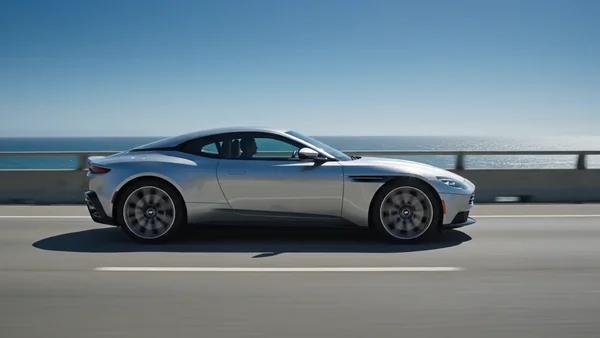
Prompt: Cinematic side-profile tracking shot of a silver sports coupe driving along a sunny coastal highway. The camera dollies smoothly alongside the car at matching speed, keeping the car centered in perfect side view (90-degree profile). Bright midday sunlight, deep blue ocean and a low guardrail on the right, clear sky, distant coastline. The car rolls steadily left-to-right; wheels spinning, subtle motion blur on the road and background rushing past. Clean automotive-commercial look, glossy paint reflections, smooth continuous motion. Locked, stable framing of the vehicle in profile.
- 16:9
- 4s
- HD
Prompt: Keep the exact same shot as the reference video: identical sunny coastal highway, same deep blue ocean and low guardrail behind, same road surface, same bright midday lighting, same side-profile camera tracking move at the same speed, same left-to-right motion and motion blur. Change ONLY the vehicle: replace the car with a bright glossy red modern sports coupe (candy-red paint with rich reflections, low sleek stance, sporty alloy wheels). The red sports car occupies the exact same position and framing in perfect 90-degree side profile, wheels spinning, rolling steadily. Everything else in the scene stays identical to the reference.
- 16:9
- 4s
- HD
Prompt: The frog character sits calmly on a large dewy leaf deep in a lush tropical rainforest at golden morning light. Soft mist drifts, water droplets glisten, ferns and glowing bokeh greenery fill the background. The frog blinks slowly and looks around, content in its natural habitat. Slow cinematic push-in, shallow depth of field, warm natural ambience.
- 16:9
- 4s
- HD
Gemini Omni Video
The original Omni: references, voices and edits to your footage.
The first Omni model. It generates from text, images and saved characters, and rebuilds clips you already have: attach a source video, pick a window of up to 10 seconds inside its first 30, describe the change.
Best for
- Restyling footage you already shot
- Narrated spots in one of 30 voices
- A recurring character across several shots
Pick another model for
- Fixed first and last frames (use Omni 1.1 Flash)
- Driving the clip with your own audio file
Specs
- Inputs
- Text plus 7 reference slots
- Source video
- Uses 2 slots, 10 s window
- Length
- 4, 6, 8 or 10 s
- Resolution
- 720p, 1080p, 4K
- Aspect ratio
- 16:9 or 9:16
- Audio
- With the clip, 30 voices
See pricesHide prices
Price
| Option | Rate | Unit |
|---|---|---|
| 720p or 1080p, 4 s | 110 | credits |
| 720p or 1080p, 6 s | 140 | credits |
| 720p or 1080p, 8 s | 170 | credits |
| 720p or 1080p, 10 s | 200 | credits |
| 720p or 1080p, with a reference video | 260 | credits |
| 4K, 4 s | 230 | credits |
| 4K, 6 s | 260 | credits |
| 4K, 8 s | 290 | credits |
| 4K, 10 s | 320 | credits |
| 4K, with a reference video | 380 | credits |
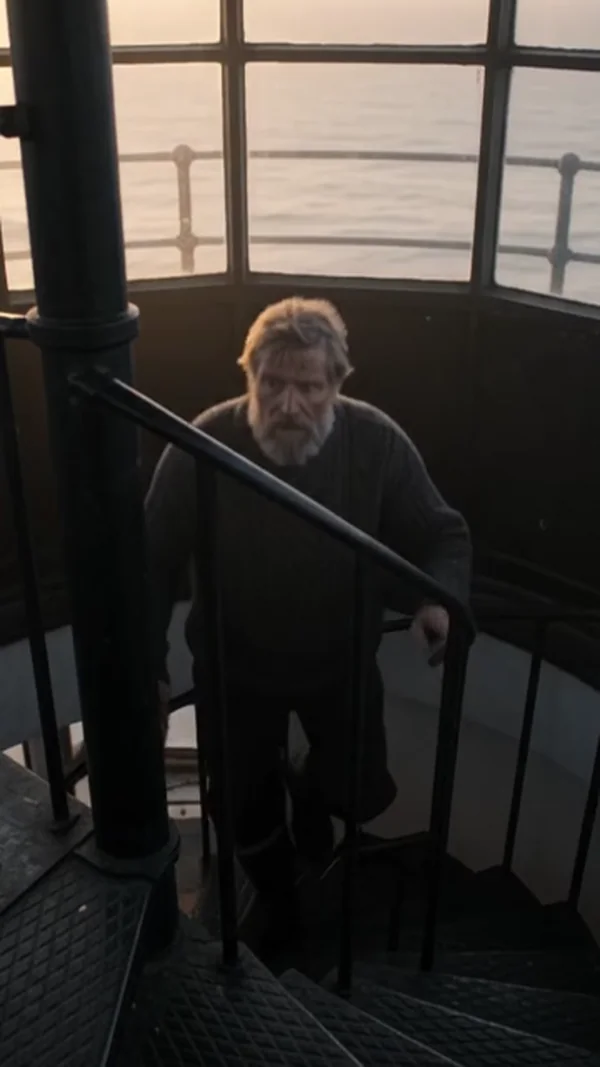
Prompt: A lighthouse keeper in a wool sweater climbs the last turn of a spiral staircase at dusk, lights the great lamp and says quietly: "Forty years, and it still feels like the first night." Wind against the glass, the lamp mechanism clicking into rotation.
- 4s
- 360p
- 9:16
Gemini Omni 1.1 Flash
Adds first and last frames, 360p drafts, longer prompts.
Everything Omni Video does, plus a first and last frame mode: give it an opening still and an optional closing one, and it animates between them. That mode stands alone, with no references, characters or source video.
Best for
- 360p drafts before the final render
- Opening and closing on exact frames
- Shot lists or scripts as the prompt
Pick another model for
- Mixing frame mode with references in one generation
- Driving the clip with your own audio file
Specs
- Inputs
- Text plus 7 reference slots
- Frame mode
- First frame, optional last frame
- Source video
- Uses 2 slots, 10 s window
- Length
- 4, 6, 8 or 10 s
- Resolution
- 360p, 720p, 1080p, 4K
- Audio
- With the clip, 30 voices
See pricesHide prices
Price
| Option | Rate | Unit |
|---|---|---|
| 360p, 4 s | 110 | credits |
| 360p, 6 s | 140 | credits |
| 360p, 8 s | 170 | credits |
| 360p, 10 s | 200 | credits |
| 360p, with a reference video | 260 | credits |
| 720p, 4 s | 120 | credits |
| 720p, 6 s | 150 | credits |
| 720p, 8 s | 180 | credits |
| 720p, 10 s | 210 | credits |
| 720p, with a reference video | 270 | credits |
| 1080p, 4 s | 130 | credits |
| 1080p, 6 s | 160 | credits |
| 1080p, 8 s | 190 | credits |
| 1080p, 10 s | 220 | credits |
| 1080p, with a reference video | 280 | credits |
| 4K, 4 s | 230 | credits |
| 4K, 6 s | 260 | credits |
| 4K, 8 s | 290 | credits |
| 4K, 10 s | 320 | credits |
| 4K, with a reference video | 380 | credits |
Omni Video and Omni 1.1 Flash
| Model | Resolution | First and last frame | Prompt limit |
|---|---|---|---|
 Gemini Omni Video Gemini Omni Video | 720p, 1080p, 4K | No | 5,000 characters |
 Gemini Omni 1.1 Flash Gemini Omni 1.1 Flash | 360p, 720p, 1080p, 4K | Yes | 20,000 characters |
Which Omni model should I use?
Draft a scripted shot at 360p
Gemini Omni 1.1 Flash
Only Flash has 360p; re-run the keeper at higher resolution.
Open and close on exact frames
Gemini Omni 1.1 Flash
First and last frame mode exists only on Flash.
Continue a series started on Omni Video
Gemini Omni Video
Same model as earlier shots keeps look and voices consistent.
How the family fits together
Omni is built around references: seven slots per generation, where an image or saved character takes one and a source video takes two. Speech, ambience and music come out of the same render, voiced by one of 30 built-in voices. Omni 1.1 Flash is the newer version.
Working with Gemini Omni
- Count slots: 7 in total, a source video uses 2, so 5 remain for images or characters.
- Trim the source first: only a window of up to 10 seconds, inside its first 30, is used.
- Put spoken lines in quotes and preview voices in the picker before you render.
Pick a plan
One credit balance covers images, video and audio. Pick the size that fits how much you make.
Studio Pro
Studio value with extra headroom.

2 seats included
What you'll generate
- Images~1,600
- Songs~492
- Videos~640
- Separations~1,066
- Caption Minutes~213
- All modelsIncluded
Starter
Low tier generations for regular use.
What you'll generate
- Images~275
- Songs~84
- Videos~110
- Separations~183
- Caption Minutes~36
- All modelsIncluded
Pro
Access full experience.
What you'll generate
- Images~650
- Songs~200
- Videos~260
- Separations~433
- Caption Minutes~86
- All modelsIncluded
Powerhouse
Most cost efficient.
13,000 credits/mo
Extra seats €19/seat/mo
What you'll generate
- Images~3,250
- Songs~1,000
- Videos~1,300
- Separations~2,166
- Caption Minutes~433
- All modelsIncluded
Enterprise
For teams that outgrow standard plans.
Pricing tailored to your team
What's included
- Custom number of seats
- Custom credit volume
- Invoice billing
- Priority support
Starter
Low tier generations for regular use.
What you'll generate
- Images~275
- Songs~84
- Videos~110
- Separations~183
- Caption Minutes~36
- All modelsIncluded
Pro
Access full experience.
What you'll generate
- Images~650
- Songs~200
- Videos~260
- Separations~433
- Caption Minutes~86
- All modelsIncluded
Studio Pro
Studio value with extra headroom.
2 seats included
What you'll generate
- Images~1,600
- Songs~492
- Videos~640
- Separations~1,066
- Caption Minutes~213
- All modelsIncluded
Powerhouse
Most cost efficient.
13,000 credits/mo
Extra seats €19/seat/mo
What you'll generate
- Images~3,250
- Songs~1,000
- Videos~1,300
- Separations~2,166
- Caption Minutes~433
- All modelsIncluded
Enterprise
For teams that outgrow standard plans.
Pricing tailored to your team
What's included
- Custom number of seats
- Custom credit volume
- Invoice billing
- Priority support
Test any model with one-time credit packs
Credits never expire and don't require a subscription — buy a pack, generate, see if Kubeez fits.
Quick refill
Quick refill for short bursts of generation.
Credits
500
You pay
€6
Standard pack
Mid-size pack at the standard per-credit rate.
Credits
1,500
You pay
€18
Volume pack
Larger pack with a volume discount built in.
Credits
5,000
You pay
€60€57
Production pack
Best per-credit price for sustained production.
Credits
15,000
You pay
€180€162
Frequently asked questions
Create one from a single image and a short description, optionally with a voice. It stays in your library, works in both Omni models and uses one reference slot.
No. Pick the closest of the 30 built-in voices, each with a preview, and describe tone and pace in the prompt.
4, 6, 8 or 10 seconds from text or images. An edit follows the source window you select, up to 10 seconds.
16:9 and 9:16, on both models.
No. On Omni 1.1 Flash, frame mode is exclusive: a request that also includes images, characters or a source video is rejected before it runs.
Open Gemini Omni in the studio
Pick the model that fits your job, write your prompt and run it.