
Veo 3.1: Lite, Fast and Quality
One video model in three tiers, every clip 8 seconds with its own sound, from a prompt, a still, two frames or references.
The lineup
Prompt: A golden retriever puppy running across a sunny green meadow in slow motion, warm cinematic lighting, shallow depth of field
- 16:9
- 8s
- 4K
Prompt: Close-up photoreal vertical shot of a man in his 30s smiling and turning to look into the camera, warm soft window light from the left, handheld but steady, natural skin texture, shallow depth of field, quiet indoor ambience, realistic not AI-looking.
- 9:16
- 8s
- 720p
Prompt: Stylized 2D animated short, a cheerful red fox running through a snowy pine forest, playful upbeat indie music, soft snowfall, vivid saturated colors, hand-drawn outlines, 9:16 vertical.
- 9:16
- 8s
- 720p
Veo 3.1 Lite
The entry tier, with every Veo input mode.
Lite is the tier for ideas still moving: storyboards, social cutdowns, many takes of one hook. It keeps every input mode and output setting, so a winning shot re-runs on Fast or Quality unchanged.
Best for
- Testing several versions of one shot
- Reference-driven drafts and test takes
- Vertical social clips where 720p is enough
Pick another model for
- The final hero shot. Render it on Quality.
- More than 8 seconds in one render
Specs
- Inputs
- Text, 1 start image, 2 frames
- Reference images
- 1 to 3, 16:9 only
- Length
- 8 seconds, fixed
- Output
- 16:9 or 9:16, 720p, 1080p, 4K
- Audio
- Always generated with the clip
- Extend
- Yes, except 1080p and extended clips
See pricesHide prices
Price
| Option | Rate | Unit |
|---|---|---|
| Text to video, 720p | 45 | credits |
| Text to video, 1080p | 50 | credits |
| Text to video, 4K | 190 | credits |
| First and last frames, 720p | 45 | credits |
| First and last frames, 1080p | 50 | credits |
| First and last frames, 4K | 190 | credits |
| Reference images, 720p | 45 | credits |
| Reference images, 1080p | 50 | credits |
| Reference images, 4K | 190 | credits |
| Extend | 45 | credits |
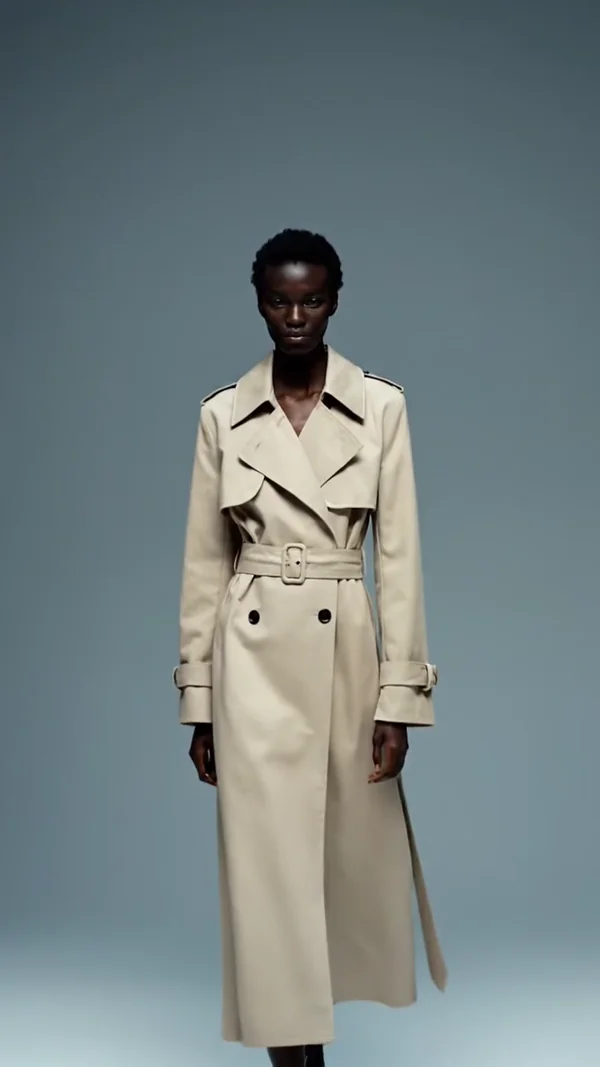
Prompt: Fashion model walking slowly toward camera in a long beige trench coat, minimalist grey-blue seamless backdrop, cinematic 24fps, natural skin, editorial framing, subtle shoulder and fabric movement, realistic 9:16 vertical.
- 9:16
- 8s
- 720p
Prompt: Stylized 2D animated short, a cheerful red fox running through a snowy pine forest, playful upbeat indie music, soft snowfall, vivid saturated colors, hand-drawn outlines, 9:16 vertical.
- 9:16
- 8s
- 720p
Prompt: A golden retriever puppy running across a sunny green meadow in slow motion, warm cinematic lighting, shallow depth of field
- 9:16
- 8s
- 4K
Veo 3.1 Fast
The middle tier: publish-ready clips with every input mode.
Fast is the tier for clips going out the door: product reveals, ad variants, explainers with a short spoken line. Unlike Quality, it takes reference images, so a series keeping one product, mascot or set belongs here.
Best for
- Publish-ready ad and product clips
- Keeping one product consistent across shots
- Extending a clip that works
Pick another model for
- Vertical reference-to-video: reference mode renders 16:9 only
Specs
- Inputs
- Text, 1 start image, 2 frames
- Reference images
- 1 to 3, 16:9 only
- Length
- 8 seconds, fixed
- Output
- 16:9 or 9:16, 720p, 1080p, 4K
- Audio
- Always generated with the clip
- Extend
- Yes, except 1080p and extended clips
See pricesHide prices
Price
| Option | Rate | Unit |
|---|---|---|
| Text to video, 720p | 75 | credits |
| Text to video, 1080p | 90 | credits |
| Text to video, 4K | 220 | credits |
| First and last frames, 720p | 75 | credits |
| First and last frames, 1080p | 90 | credits |
| First and last frames, 4K | 220 | credits |
| Reference images, 720p | 75 | credits |
| Reference images, 1080p | 90 | credits |
| Reference images, 4K | 220 | credits |
| Extend | 75 | credits |
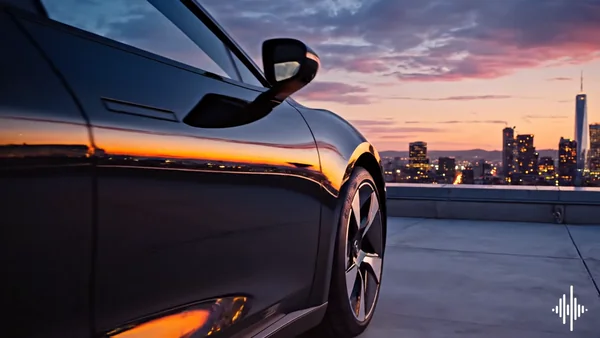
Prompt: Cinematic premium ad shot, slow camera glide past a sleek electric car on a rooftop at dusk, reflective surfaces catching sunset, soft ambient city hum with a single rising cinematic synth note, elegant branding moment, 16:9 landscape.
- 16:9
- 8s
- 720p
Prompt: Epic cinematic aerial push-in over a misty mountain valley at sunrise, anamorphic lens, soaring orchestral strings and subtle wind audio, teal-orange color grade, soft sun flare, 16:9.
- 16:9
- 8s
- 720p
Veo 3.1 Quality
The top tier, where the render is the deliverable.
Quality is the top render tier, for the shot everything else cuts around: an opening, a brand film beat, a hero product move. Settle the prompt on Lite or Fast first, then render a version you know works.
Best for
- Hero shots and opening frames
- A move between two approved stills
- 4K masters for large screens
Pick another model for
- Shots driven by reference images (not supported)
- Fast iteration; Lite and Fast take the same prompts
Specs
- Inputs
- Text, 1 start image, 2 frames
- Reference images
- Not supported
- Length
- 8 seconds, fixed
- Output
- 16:9 or 9:16, 720p, 1080p, 4K
- Audio
- Always generated with the clip
See pricesHide prices
Price
| Option | Rate | Unit |
|---|---|---|
| Text to video, 720p | 300 | credits |
| Text to video, 1080p | 320 | credits |
| Text to video, 4K | 420 | credits |
| First and last frames, 720p | 300 | credits |
| First and last frames, 1080p | 320 | credits |
| First and last frames, 4K | 420 | credits |
| Extend | 300 | credits |
The three tiers side by side
| Model | Reference images | Use it for |
|---|---|---|
 Veo 3.1 Lite Veo 3.1 Lite | 1 to 3, 16:9 | Drafts and tests |
 Veo 3.1 Fast Veo 3.1 Fast | 1 to 3, 16:9 | Publish-ready clips |
 Veo 3.1 Quality Veo 3.1 Quality | Not supported | Hero shots, 4K masters |
Which Veo 3.1 tier should I use?
Try many versions of a hook
Veo 3.1 Lite
Same modes and settings, so the winning prompt moves up unchanged.
Keep one product consistent across clips
Veo 3.1 Fast
Reference images work on Fast and Lite, not Quality.

Publish a 1080p ad clip with sound
Veo 3.1 Fast
The middle tier, with every input mode.
Render the hero shot or 4K master
Veo 3.1 Quality
The top tier, for a prompt already proven lower down.
How the family fits together
All three tiers share one studio card, the same prompt and the same 16:9 or 9:16 frame at 720p, 1080p or 4K, so a shot moves between tiers unchanged. Only one input differs: Lite and Fast take reference images, Quality does not.
Getting more out of Veo 3.1
- Write the sound into the prompt: footsteps on gravel, a closing door, one line of dialogue in quotes.
- For a vertical clip, skip reference mode and use one start image, which supports 9:16.
- For first and last frame, keep camera height and lighting close between the two images.
Pick a plan
One credit balance covers images, video and audio. Pick the size that fits how much you make.
Studio Pro
Studio value with extra headroom.

2 seats included
What you'll generate
- Images~1,600
- Songs~492
- Videos~640
- Separations~1,066
- Caption Minutes~213
- All modelsIncluded
Starter
Low tier generations for regular use.
What you'll generate
- Images~275
- Songs~84
- Videos~110
- Separations~183
- Caption Minutes~36
- All modelsIncluded
Pro
Access full experience.
What you'll generate
- Images~650
- Songs~200
- Videos~260
- Separations~433
- Caption Minutes~86
- All modelsIncluded
Powerhouse
Most cost efficient.
13,000 credits/mo
Extra seats €19/seat/mo
What you'll generate
- Images~3,250
- Songs~1,000
- Videos~1,300
- Separations~2,166
- Caption Minutes~433
- All modelsIncluded
Enterprise
For teams that outgrow standard plans.
Pricing tailored to your team
What's included
- Custom number of seats
- Custom credit volume
- Invoice billing
- Priority support
Starter
Low tier generations for regular use.
What you'll generate
- Images~275
- Songs~84
- Videos~110
- Separations~183
- Caption Minutes~36
- All modelsIncluded
Pro
Access full experience.
What you'll generate
- Images~650
- Songs~200
- Videos~260
- Separations~433
- Caption Minutes~86
- All modelsIncluded
Studio Pro
Studio value with extra headroom.
2 seats included
What you'll generate
- Images~1,600
- Songs~492
- Videos~640
- Separations~1,066
- Caption Minutes~213
- All modelsIncluded
Powerhouse
Most cost efficient.
13,000 credits/mo
Extra seats €19/seat/mo
What you'll generate
- Images~3,250
- Songs~1,000
- Videos~1,300
- Separations~2,166
- Caption Minutes~433
- All modelsIncluded
Enterprise
For teams that outgrow standard plans.
Pricing tailored to your team
What's included
- Custom number of seats
- Custom credit volume
- Invoice billing
- Priority support
Test any model with one-time credit packs
Credits never expire and don't require a subscription — buy a pack, generate, see if Kubeez fits.
Quick refill
Quick refill for short bursts of generation.
Credits
500
You pay
€6
Standard pack
Mid-size pack at the standard per-credit rate.
Credits
1,500
You pay
€18
Volume pack
Larger pack with a volume discount built in.
Credits
5,000
You pay
€60€57
Production pack
Best per-credit price for sustained production.
Credits
15,000
You pay
€180€162
Frequently asked questions
8 seconds on every tier, with no length setting. For longer sequences, extend a finished clip from its menu or plan several 8 second shots.
Yes. Attach one image and the clip starts from it, or attach exactly two and Veo animates the move from the first to the second.
Finished Veo 3.1 clips, from the clip menu, on the Lite, Fast or Quality extend tier. Clips rendered at 1080p and clips that are already extensions cannot be extended.
No. Translation is switched on by default before the prompt reaches the model.
Yes. Each tier and mode has its own model id, with -1080p or -4k at the end for higher resolutions. get_models lists them all.
Open Veo in the studio
Pick the model that fits your job, write your prompt and run it.