
P-Video
Clips of 1 to 20 seconds from a prompt or a start frame, with a draft mode and lip sync to your own audio.
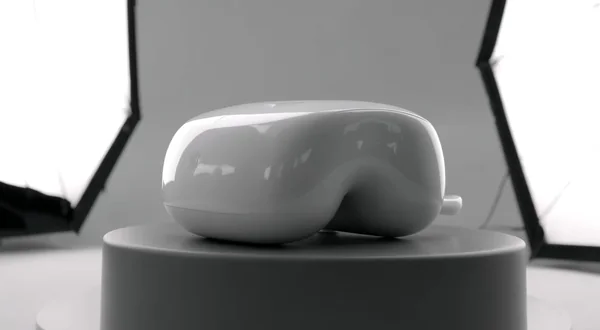
Prompt: Modern wireless earbuds case rotating slowly on a matte pedestal, studio softbox lighting from above, subtle reflections on the glossy white surface, clean white seamless cyc background, minimal clean advertising motion.
- 16:9
- 5s
- 720p
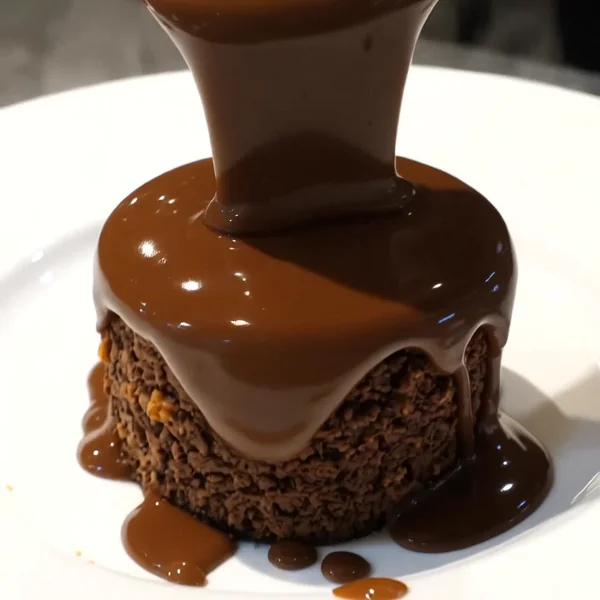
Prompt: Slow-motion chocolate sauce cascading over a freshly baked chocolate lava cake on a white ceramic plate, dark ganache drip, steam rising, studio overhead light, sharp macro detail, 1:1 square.
- 1:1
- 5s
- 720p
Prompt: A chimpanzee in a full business suit sitting at a desk in a boring beige office, slowly typing on a laptop, sideways glance at the camera, dry sitcom lighting, subtle awkward pause, 16:9 landscape.
- 16:9
- 5s
- 720p
P-Video
Draft fast, then sync a clip to your audio.
Draft mode is the workflow tool: softer, quicker renders at both 720p and 1080p. Test ideas in draft, then switch it off for the take you keep. The prompt and inputs stay the same.
Best for
- Talking characters synced to your voice file
- Quick hook and concept tests
- Single clips from 10 to 20 seconds
Pick another model for
- Editing an existing video, there is no video input
- 4K output or prompts over 2,000 characters
Specs
- Inputs
- Text, start frame, optional end frame
- Audio input
- mp3, wav or flac (15 MB)
- Length
- 1 to 20 s, or audio's
- Resolution
- 720p or 1080p
- Aspect ratio
- Seven, ignored with a start image
- Frame rate
- 24 or 48 fps
See pricesHide prices
Price
| Option | Rate | Unit |
|---|---|---|
| 720p | 7 | credits / sec |
| 720p, draft | 4 | credits / sec |
| 1080p | 12 | credits / sec |
| 1080p, draft | 6 | credits / sec |
How the family fits together
P-Video is a speed-first video model, the video counterpart of P Image Edit. One model covers text-to-video and image-to-video. Attach a voice, song or voiceover and the clip takes the audio's length, with mouth and motion following the sound.
Working with P-Video
- With audio attached, the length setting is ignored, so trim the file before uploading.
- Describe the character, framing and setting; let the audio carry the timing and words.
- Use 48 fps for fast motion and 24 fps for a more filmic feel.
Pick a plan
One credit balance covers images, video and audio. Pick the size that fits how much you make.
Studio Pro
Studio value with extra headroom.

2 seats included
What you'll generate
- Images~1,600
- Songs~492
- Videos~640
- Separations~1,066
- Caption Minutes~213
- All modelsIncluded
Starter
Low tier generations for regular use.
What you'll generate
- Images~275
- Songs~84
- Videos~110
- Separations~183
- Caption Minutes~36
- All modelsIncluded
Pro
Access full experience.
What you'll generate
- Images~650
- Songs~200
- Videos~260
- Separations~433
- Caption Minutes~86
- All modelsIncluded
Powerhouse
Most cost efficient.
13,000 credits/mo
Extra seats €19/seat/mo
What you'll generate
- Images~3,250
- Songs~1,000
- Videos~1,300
- Separations~2,166
- Caption Minutes~433
- All modelsIncluded
Enterprise
For teams that outgrow standard plans.
Pricing tailored to your team
What's included
- Custom number of seats
- Custom credit volume
- Invoice billing
- Priority support
Starter
Low tier generations for regular use.
What you'll generate
- Images~275
- Songs~84
- Videos~110
- Separations~183
- Caption Minutes~36
- All modelsIncluded
Pro
Access full experience.
What you'll generate
- Images~650
- Songs~200
- Videos~260
- Separations~433
- Caption Minutes~86
- All modelsIncluded
Studio Pro
Studio value with extra headroom.
2 seats included
What you'll generate
- Images~1,600
- Songs~492
- Videos~640
- Separations~1,066
- Caption Minutes~213
- All modelsIncluded
Powerhouse
Most cost efficient.
13,000 credits/mo
Extra seats €19/seat/mo
What you'll generate
- Images~3,250
- Songs~1,000
- Videos~1,300
- Separations~2,166
- Caption Minutes~433
- All modelsIncluded
Enterprise
For teams that outgrow standard plans.
Pricing tailored to your team
What's included
- Custom number of seats
- Custom credit volume
- Invoice billing
- Priority support
Test any model with one-time credit packs
Credits never expire and don't require a subscription — buy a pack, generate, see if Kubeez fits.
Quick refill
Quick refill for short bursts of generation.
Credits
500
You pay
€6
Standard pack
Mid-size pack at the standard per-credit rate.
Credits
1,500
You pay
€18
Volume pack
Larger pack with a volume discount built in.
Credits
5,000
You pay
€60€57
Production pack
Best per-credit price for sustained production.
Credits
15,000
You pay
€180€162
Frequently asked questions
Attach an mp3, wav or flac file with the prompt, with or without a start image. The clip runs as long as the audio, and billing uses the measured audio length.
Yes. Without an audio file, sound is generated with the clip.
Yes. Attach two images: the first is the start frame, the second the end frame.
Yes. Both are tuned for quick turnaround. P Image Edit has its own page for image edits.
Yes. The model id is p-video, with quality set to 720p, 720p-draft, 1080p or 1080p-draft. Send audio in source_media_urls, uploaded through get_upload_url so its length is measured.
Open P-Video in the studio
Pick the model that fits your job, write your prompt and run it.