Z-Image: The Fastest AI Image Generator (Under 2 Seconds)
Speed vs quality trade-offs, bulk generation, and rapid iteration with the fastest AI image model available.
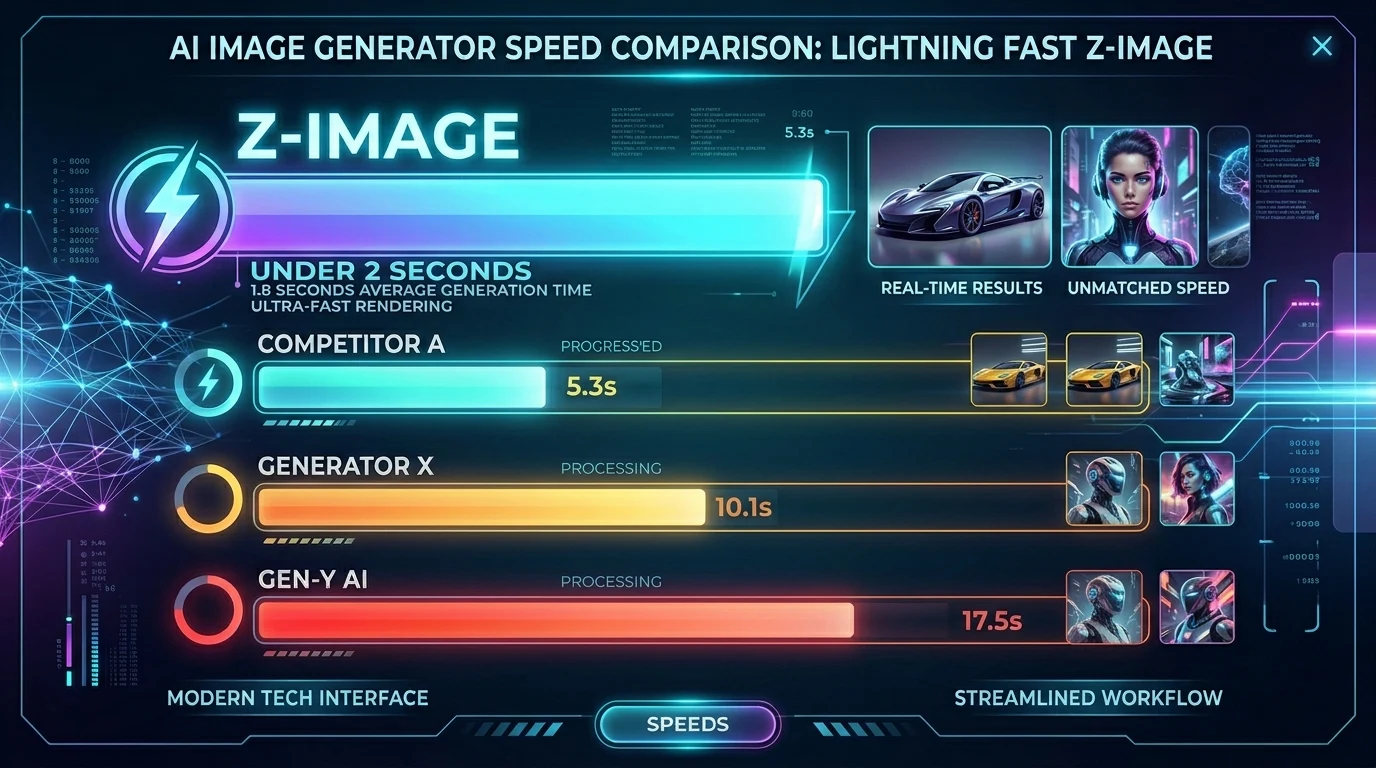
When you need images fast—for rapid iteration, bulk generation, or quick previews—Z-Image delivers. It generates images in under 2 seconds, making it the fastest option on Kubeez. At ~3 credits per image, it's also one of the most affordable.
Z-Image trades some quality for speed. For concept exploration, A/B testing, and high-volume workflows, that trade-off is often worth it.
#When Speed Matters
Rapid iteration: Try 10 prompt variations in 20 seconds. See what works before committing to a slower, higher-quality model.
Bulk generation: Need 50 product variations? Z-Image can produce them in minutes instead of hours.
Quick previews: Show clients or stakeholders rough concepts before investing in premium models.
Budget testing: Experiment with ideas at low cost. Upgrade to Nano Banana or GPT-1.5-image for final assets.
#Speed vs Quality
| Model | Speed | Quality | Cost | Best for |
|---|---|---|---|---|
| Z-Image | ~2 sec | Good | ~3 credits | Speed, bulk, previews |
| Nano Banana 2 | ~44 sec | Excellent | ~14 credits | Default, characters |
| GPT-1.5-image-high | ~46 sec | Excellent (text) | ~32 credits | Infographics, typography |
Z-Image produces solid, usable images. For marketing materials where typography, fine detail, or character consistency matter, Nano Banana 2 or Pro is better. For quick concepts and bulk work, Z-Image wins.
#Use Cases
Mood boards: Generate many style options quickly. Narrow down, then refine with a premium model.
Thumbnail testing: Create multiple thumbnail concepts for A/B testing. Fast iteration means more variants.
Social content: When volume matters more than perfection—daily posts, stories, quick graphics.
Prototyping: UI mockups, concept art, placeholder visuals for presentations.
#Workflow: Z-Image First, Premium Later
- Generate with Z-Image — 5–10 variations in under a minute
- Select the best — Pick the direction that works
- Refine with Nano Banana 2 — Regenerate the chosen concept at higher quality
- Final polish — Use Pro 4K or GPT-1.5-image if needed for hero assets
This approach saves time and credits while still delivering premium output for final deliverables.
#Limitations
- Text rendering: Z-Image is not ideal for text-heavy images. Use GPT-1.5-image-high for infographics and ad copy.
- Character consistency: For consistent characters across images, Nano Banana is stronger.
- Fine detail: Complex compositions and intricate elements benefit from higher-tier models.
For simple scenes, product shots, and concept exploration, Z-Image is excellent.
Try Z-Image on Kubeez for the fastest AI image generation.
Dex writes the Kubeez guides and makes every example with the same tools you use.
See also
Try these tools
Models in this post
Keep reading
- Make a Photo Talk or Sing With OmniHuman 2.0Make a photo talk or sing on Kubeez: voice a line with text to speech, pick a portrait that syncs well and turn both into a lip-synced OmniHuman 2.0 video.
- Kling 4.0 Tutorial: Video From Reference Images and ClipsMake a video from reference images and clips with Kling 4.0 on Kubeez: name files @image_1 and @video_1, write the prompt, and follow a real run step by step.
- Kling 4.0 on Kubeez: Video From Prompts, Stills and ClipsKling 4.0 is live on Kubeez: one video model for prompts and references, with up to 10 images and 5 clips, 3 to 30 second output and native sound built in.
- OmniHuman 2.0 on Kubeez: Make a Photo Talk or SingOmniHuman 2.0 is live on Kubeez: one portrait and one audio file become a lip-synced 720p video of that person talking or singing, as long as the audio.