Technology
GPT Image 2.5 vs Nano Banana 2: The Honest Split
GPT Image 2.5 vs Nano Banana 2: text and layout control against photorealism and price. We ran the identical poster prompt on both models. Credits inside.
· Dex
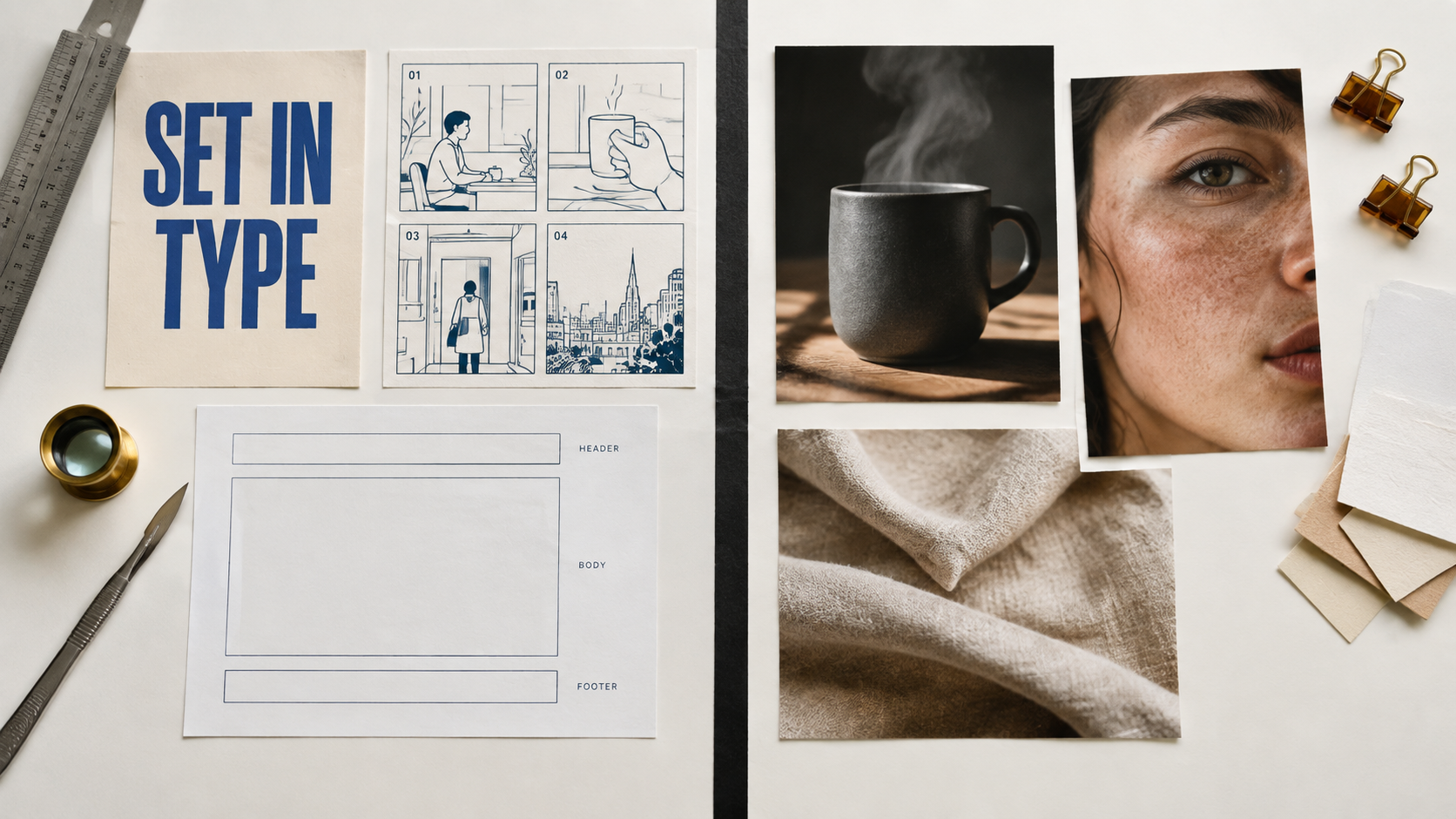
GPT Image 2.5 vs Nano Banana 2 is the image model question worth asking this week, and the useful answer is not "one of them is better". They are good at different jobs. OpenAI's new line went live on Kubeez on 9 September 2026, one day after it was announced. Google's Nano Banana 2 has been the workhorse here for months. Both run off the same Kubeez credit balance, so you never have to pick one and live with it. You pick per brief.
This post is the honest split: what each model is genuinely stronger at, what each one costs in credits, the specs that actually differ, and one test we ran with the identical prompt on both models so you can judge the text claim with your own eyes instead of taking ours.
The short answer
| What you are making | Pick | Why |
|---|---|---|
| Poster, ad, thumbnail with readable headline text | GPT Image 2.5 | Holds the layout around the text, not just the spelling |
| Diagram, flow, numbered panels, before and after | GPT Image 2.5 | Holds ordered structure and labels |
| App screen mockup, dashboard, UI-like layout | GPT Image 2.5 | Respects grids and exact placement |
| Edit the same image over several rounds | GPT Image 2.5 Sunburst | The lane built for edit control |
| Product hero, packshot, catalogue shot | Nano Banana 2 | Material and light realism |
| People, skin, hair, portraits | Nano Banana 2 | Cleaner, less plasticky faces |
| Cinematic mood, film stock feel, shot language | Nano Banana 2 | Camera behaviour is more convincing |
| Volume work on a budget | Nano Banana 2 | Cheaper per image at every resolution |
Where GPT Image 2.5 pulls ahead
Text inside the image. This is the headline difference. GPT Image 2 scored near perfect on text rendering in LM Arena blind tests, and the 2.5 line inherits that strength. If your deliverable has words baked into the pixels, a launch poster, an ad with a price line, a thumbnail with four words that must be spelled correctly, this is the family that holds up as the text gets denser and the layout gets stricter.
Structure that has to stay in order. Numbered panels, a three step diagram, a comparison chart with matching row heights, a storyboard strip that reads left to right. Give it an ordering and it tends to keep it.
Exact placement. "Logo lockup bottom right, headline in the top third, thirty percent clear margin on the left for a caption overlay" is the kind of instruction the 2.5 line follows rather than reinterprets.
Multi round edit control. The Sunburst lane exists for the case where you generate once and then iterate: change the shirt colour, keep everything else, now move the product left, keep everything else. If you want the full breakdown of when to use each lane, we wrote that up separately in Flare vs Sunburst.
Bigger reference budget. Sixteen input images against Nano Banana 2's eight, which matters for character sheets, brand kits and multi product scenes.
Where Nano Banana 2 pulls ahead
Photorealism. Skin that reads as skin, hair with actual strand separation, pores, fabric weave, brushed metal, ceramic glaze. Google's line still has the edge on material truth.
Light. Raking side light, window light, golden hour, hard key with a soft bounce. Nano Banana 2 renders light as though a physical lamp were present, which is why product and lifestyle work lands so easily.
Camera language. Ask for an 85mm at f2 with a shallow plane of focus and you get something that looks shot rather than assembled. Ask for a low angle hero and it understands the geometry of the lens, not just the words.
Price. It is cheaper than GPT Image 2.5 at every resolution tier, which compounds fast when you are producing forty variants of a catalogue shot rather than one poster.
The same prompt on both models
We wrote one prompt, an A2 event poster with three separate text zones, a bold headline, a lighter subhead, and a line of fine print containing numbers and a slash. Then we sent the exact same prompt string to gpt-image-2-5-flare and to nano-banana-2, same 16:9 aspect ratio, same 1K resolution, no re-rolls and no per model prompt tuning. A poster with typography in three weights is the fair test here, because it measures two things at once: whether the letterforms come out right, and whether the model obeys a strict composition brief while carrying them.
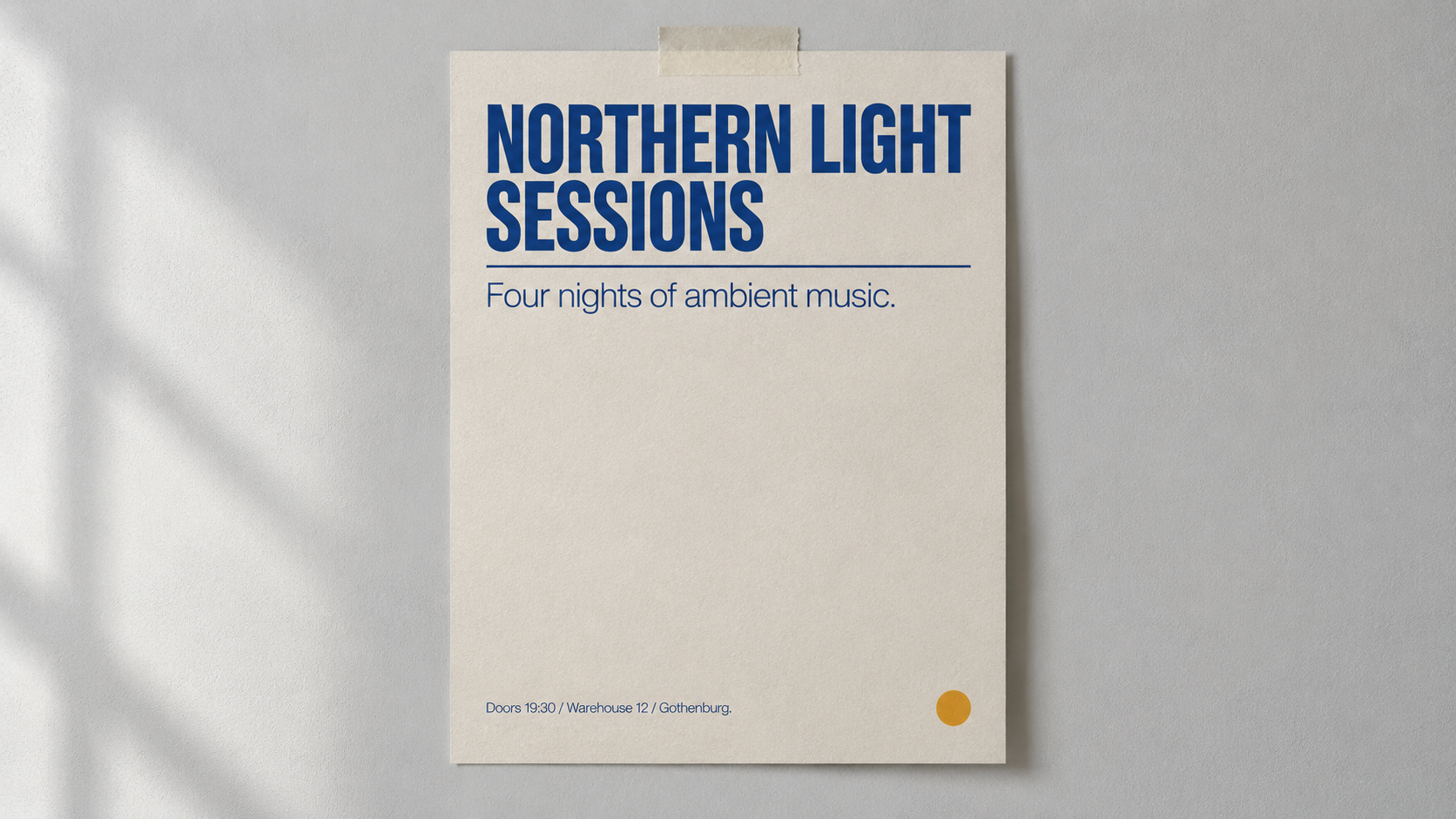
Rendered on gpt-image-2-5-flare, 16:9, 1K, 15 credits.
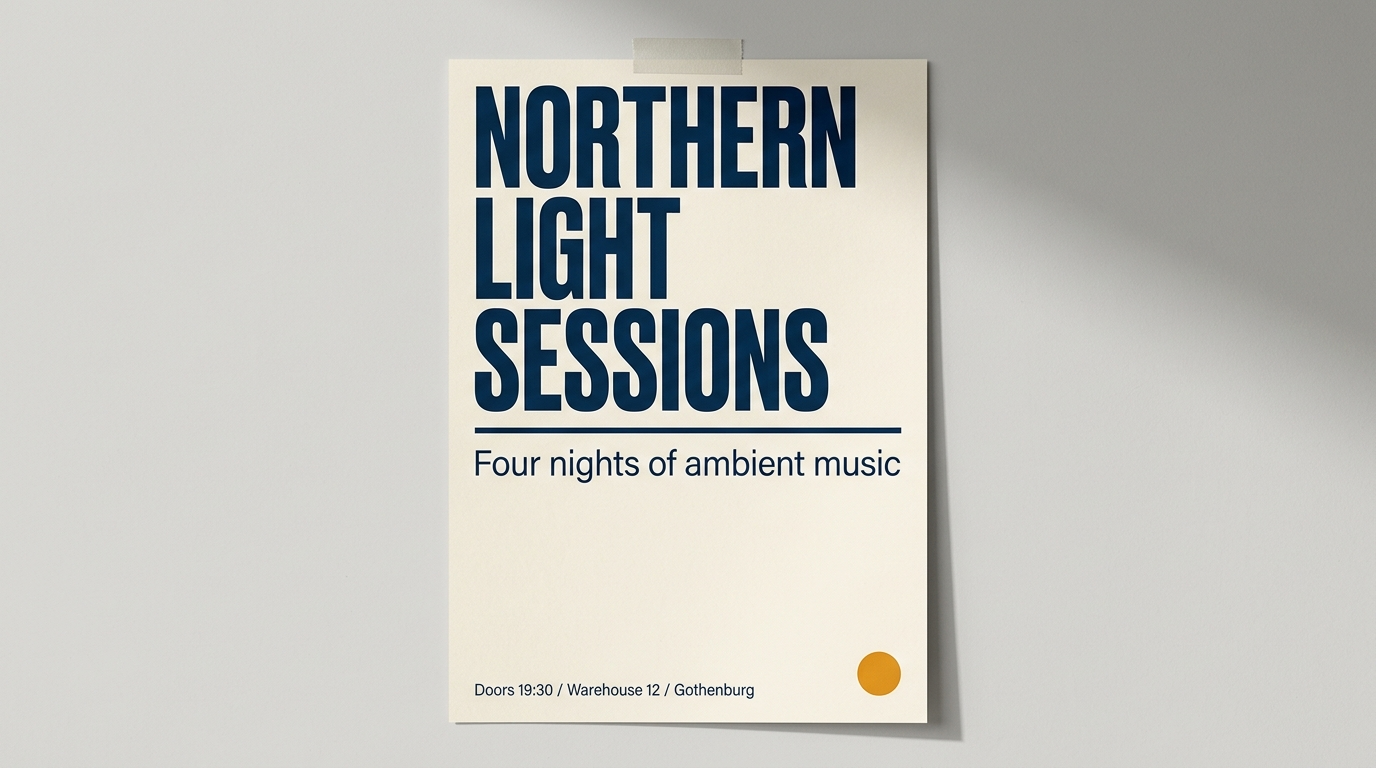
Rendered on nano-banana-2 from the identical prompt, 16:9, 1K, 11 credits.
Both models spelled every word correctly. That is the first honest thing to say, and it deserves saying loudly, because the lazy version of this comparison claims Google's line cannot render text. Three text zones, mixed case, a time with a colon, two slashes, and neither render produced a typo.
The difference showed up in layout discipline. The brief asked for a poster photographed straight on, filling most of the frame, with the headline across the upper third. GPT Image 2.5 Flare delivered exactly that: the poster square to the camera, the headline broken over two lines and stopping where it was told to stop, the rule spanning the full measure, and real directional daylight throwing a window pattern across the wall. Nano Banana 2 tilted the poster into a slight three quarter perspective, ran the headline over three lines into the upper half, and left a large empty stretch of wall on the right.
One point back to Google, and it is not a small one. Nano Banana 2 set the copy exactly as written. GPT Image 2.5 added full stops to the subhead and to the fine print that were nowhere in the prompt. If you are producing brand assets where the copy is signed off to the character, that is a real correction round.
So the honest read of the text claim is not that one model can spell and the other cannot. It is that the OpenAI line follows the compositional instruction, which is what actually decides the job once your words have to live inside a layout with margins, a hierarchy and a reserved corner for a logo. On one short headline with room to breathe, either model will get you there, and Nano Banana 2 will do it for four fewer credits.
The other side of the split
The same fairness applies in reverse. Here is a single Nano Banana 2 render of a matte stoneware pour over brewer under a hard raking key light, no text in the brief at all, just material and light.
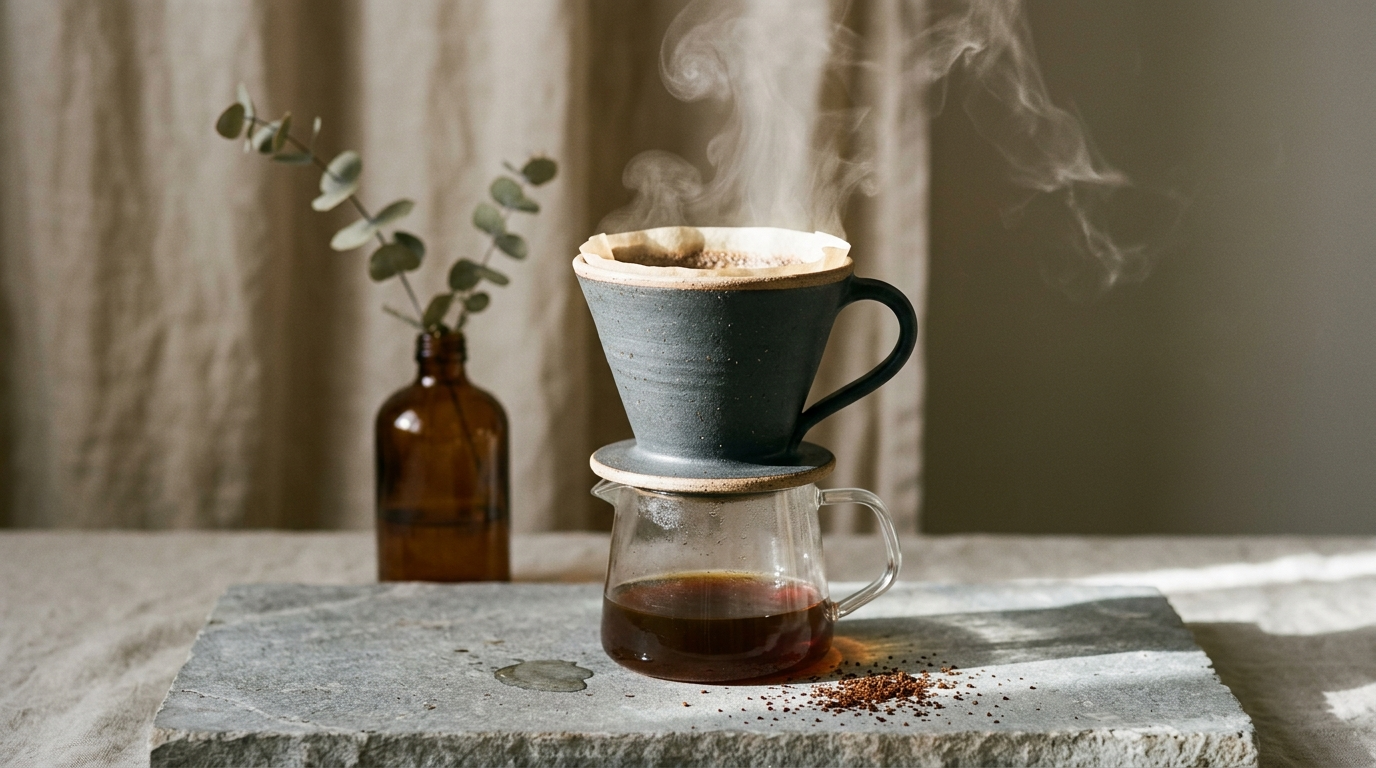
Rendered on nano-banana-2, 16:9, 1K, 11 credits.
Clay grain, iron speckle in the glaze, the way the light dies off across the limestone. This is the work where the Google line is worth paying attention to, and where the extra credits for the OpenAI line buy you nothing you needed.
Specs side by side
| GPT Image 2.5 | Nano Banana 2 | |
|---|---|---|
| Lanes | Flare and Sunburst | One model, three resolution tiers |
| Input images | 16 | 8 |
| Prompt length | 20,000 characters | 20,000 characters |
| Aspect ratios | Thirteen documented | Eleven, including auto |
| Resolutions | 1K, 2K, 4K | 1K, 2K, 4K |
| Modes | Text to image and image to image | Text to image and image to image |
| Negative prompt | Not supported | Not supported |
Flare is the fast default and runs at up to 50 percent lower latency than GPT Image 2. Sunburst is the premium lane for edit control. Both carry the same capability sheet above.
Credits side by side
| Model | 1K | 2K | 4K |
|---|---|---|---|
| GPT Image 2.5 Flare | 15 | 20 | 28 |
| GPT Image 2.5 Sunburst | 15 | 20 | 28 |
| Nano Banana 2 | 11 | 15 | 25 |
| Nano Banana 2 Lite | 8 | ||
| Nano Banana Pro | 24 | 24 | 30 |
Nano Banana 2 is four credits cheaper at 1K, five cheaper at 2K and three cheaper at 4K. On a single hero image that gap is noise. On a batch of sixty product variants it is a real line item, and it is the main reason to default to the Google line for volume work and reach for the OpenAI line when the brief has words in it.
Where Nano Banana Pro fits
Nano Banana Pro sits above Nano Banana 2 and is the strongest text renderer in Google's family, which narrows the gap on typography without closing it. It costs 24 credits at both 1K and 2K, so the 2K tier is the value pick, and 30 at 4K. If you want photoreal work that also carries a short line of copy, Pro is the sensible middle. We compared the three Google tiers in detail in Nano Banana 2 vs Pro vs Lite.
How to actually decide
- Does the deliverable contain words? Yes, start with GPT Image 2.5. No, start with Nano Banana 2.
- Is it a photograph of a real object or person? Nano Banana 2, or Pro if it also needs a caption line.
- Will you iterate on the same frame more than twice? GPT Image 2.5 Sunburst.
- Are you making one hero or sixty variants? One hero, cost does not matter, pick on quality. Sixty variants, the credit gap decides.
- Still unsure? Run both. Two 1K renders cost 26 credits together, which is cheaper than an hour of arguing about it.
That last point is the actual argument for having both on one platform. A head to head that would otherwise mean two subscriptions, two dashboards and two invoices is one balance and two model ids here.
Running both from one balance
Every model in this post is available in Media Studio and on the AI image tools page, and through the Kubeez MCP server and REST API with these ids:
gpt-image-2-5-flaregpt-image-2-5-sunburstnano-banana-2nano-banana-2-2Knano-banana-2-4Knano-banana-pro
The full capability sheet for each, including current credit costs, lives on available models. If you drive Kubeez from an editor, connecting GPT Image 2.5 over MCP means you can ask for both renders in one message and compare them without leaving your project.
FAQ
Is GPT Image 2.5 better than Nano Banana 2?
For precise layout, diagrams, ordered panels and text that has to sit exactly where you put it, yes. For photorealism, skin, materials and cinematic light, Nano Banana 2 is still the better pick, and it is cheaper per image at every resolution.
How much does GPT Image 2.5 cost on Kubeez?
15 credits at 1K, 20 at 2K and 28 at 4K, and both the Flare and Sunburst lanes are priced the same.
How much does Nano Banana 2 cost on Kubeez?
11 credits at 1K, 15 at 2K and 25 at 4K. Nano Banana 2 Lite is 8 credits, and Nano Banana Pro is 24 at 1K and 2K and 30 at 4K.
What is the difference between Flare and Sunburst?
Flare is the fast default and runs at up to 50 percent lower latency than GPT Image 2. Sunburst is the premium lane built for multi round edit control. Same credit cost, same capability sheet, different behaviour under iteration.
Can I use both models on the same project?
Yes. Both draw on one Kubeez balance, so a common pattern is to build the photographic base plate on Nano Banana 2 and then hand it to GPT Image 2.5 as an input image to add the typography.
Which model handles more reference images?
GPT Image 2.5 accepts up to 16 input images. Nano Banana 2 accepts up to 8.
The takeaway
There is no single winner here, and any post that gives you one is selling something. GPT Image 2.5 is the model you reach for when the image has to say something in words, hold a structure, or survive five rounds of edits. Nano Banana 2 is the model you reach for when the image has to look like it was photographed, and it does that for fewer credits. The genuinely useful position is having both on tap, which is what one Kubeez balance buys you.
Start in Media Studio, or read the wider field in GPT Image 2 vs Nano Banana 2 vs Seedream 5 Lite.
Dex writes the Kubeez guides and makes every example with the same tools you use.