
A slow orbit around one product with quiet sound, framed square for product pages and feeds.
AI photos and videos for retail and ecommerce
Product clips, lookbooks and showroom shots for online stores, fashion and car dealers.
Online stores
Shoppers cannot pick the product up, so the pictures do the selling. Give every listing a short clip, a photo of the item in a real home and a post for the day it comes back in stock.
Fashion brands
A collection sells on fit, fabric and mood. Put the lookbook on an invented model, lay each outfit out from above and show how a pleat swings when someone walks. Attach photos of your own pieces to keep them true.
A full length, on-model photo in daylight, with fabric creases and skin that read as real.
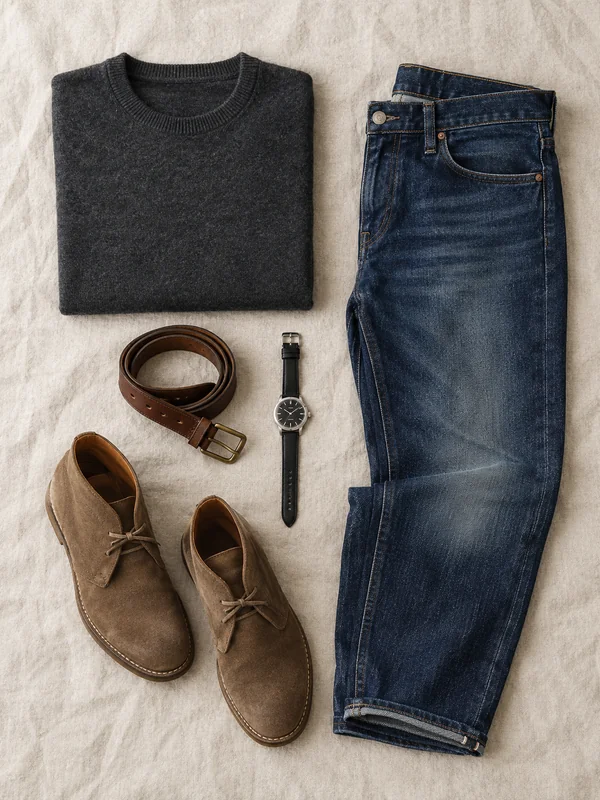
One complete outfit laid out on linen and shot from above, for product pages and styling posts.
A vertical clip of a garment moving with every step, with footsteps and music.
Car dealerships
Stock changes every week and every car needs its own posts. Film a walkaround under showroom lights, announce what just reached the forecourt and pick out the wheels, lights and paint in close detail.
A clean front three quarter photo of a car under showroom spotlights, for listings and launch posts.

A forecourt photo with a short headline at the top, for the morning a car goes on sale.
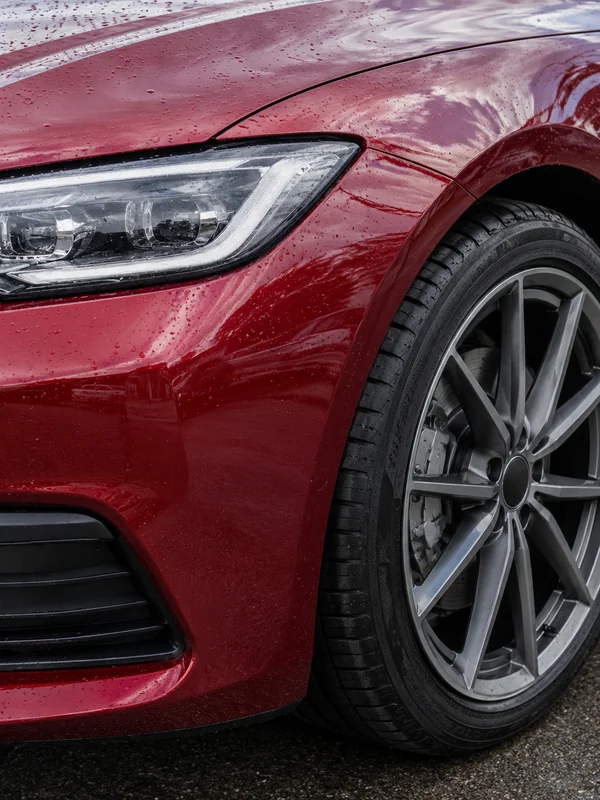
Tight shots of the wheel, headlight and paint finish for ads, posts and the gallery under a walkaround.
Why it works for retail
Built around the product you sell
Attach up to 16 photos of the item and GPT Image 2.5 edits against them, so the scene starts from the bowl, bag or bottle you sell. Ask for a transparent background and you get a PNG cutout with a real alpha channel.

One look in every frame shape
GPT Image 2.5 renders all 13 of its aspect ratios at 1K, 2K or 4K, from a tall 2:3 lookbook page to a 21:9 homepage banner. For a 4:5 feed slot, generate at 3:4 and crop.

Start from the car on your lot
Attach a photo of a car you have in stock and GPT Image 2.5 edits against it: a cleaner floor, evening light, the showroom you want. Output comes at 1K, 2K or 4K, for the listing gallery or a print banner.

How it works
- 1
Add your photos
Optional. Upload a room, a dish or a car so the result matches your real place.
- 2
Write the prompt
Describe the shot the way you would to a photographer, or start from an example on this page.
- 3

Generate and post
Download the image or video and post it wherever your guests and customers look.
Pick a plan
One credit balance covers images, video and audio. Pick the size that fits how much you make.
Most popular
Studio Pro
Studio value with extra headroom.
49 €month
6,400credits / month
Team seats

2 seats included
What you'll generate
- Images~1,600
- Songs~492
- Videos~640
- Separations~1,066
- Caption Minutes~213
- All modelsIncluded
Starter
Low tier generations for regular use.
10 €month
1,100credits / month
What you'll generate
- Images~275
- Songs~84
- Videos~110
- Separations~183
- Caption Minutes~36
- All modelsIncluded
Pro
Access full experience.
20 €month
2,600credits / month
What you'll generate
- Images~650
- Songs~200
- Videos~260
- Separations~433
- Caption Minutes~86
- All modelsIncluded
Powerhouse
Most cost efficient.
99 €month
13,000credits / month
13,000 credits/mo
Team seats
3 seats
Extra seats €19/seat/mo
What you'll generate
- Images~3,250
- Songs~1,000
- Videos~1,300
- Separations~2,166
- Caption Minutes~433
- All modelsIncluded
Enterprise
For teams that outgrow standard plans.
Custom
Pricing tailored to your team
What's included
- Custom number of seats
- Custom credit volume
- Invoice billing
- Priority support
Starter
Low tier generations for regular use.
10 €month
1,100credits / month
What you'll generate
- Images~275
- Songs~84
- Videos~110
- Separations~183
- Caption Minutes~36
- All modelsIncluded
Pro
Access full experience.
20 €month
2,600credits / month
What you'll generate
- Images~650
- Songs~200
- Videos~260
- Separations~433
- Caption Minutes~86
- All modelsIncluded
Most popular
Studio Pro
Studio value with extra headroom.
49 €month
6,400credits / month
Team seats
2 seats included
What you'll generate
- Images~1,600
- Songs~492
- Videos~640
- Separations~1,066
- Caption Minutes~213
- All modelsIncluded
Powerhouse
Most cost efficient.
99 €month
13,000credits / month
13,000 credits/mo
Team seats
3 seats
Extra seats €19/seat/mo
What you'll generate
- Images~3,250
- Songs~1,000
- Videos~1,300
- Separations~2,166
- Caption Minutes~433
- All modelsIncluded
Enterprise
For teams that outgrow standard plans.
Custom
Pricing tailored to your team
What's included
- Custom number of seats
- Custom credit volume
- Invoice billing
- Priority support
Or pay-as-you-go
Test any model with one-time credit packs
Credits never expire and don't require a subscription — buy a pack, generate, see if Kubeez fits.
Quick refill
Quick refill for short bursts of generation.
Credits
500
You pay
€6
Standard pack
Mid-size pack at the standard per-credit rate.
Credits
1,500
You pay
€18
−5%
Volume pack
Larger pack with a volume discount built in.
Credits
5,000
You pay
€60€57
−10%
Production pack
Best per-credit price for sustained production.
Credits
15,000
You pay
€180€162
Questions
Yes. Attach them as references, up to 16 per image, and the result starts from your item instead of an invented one. Compare it with the real thing before it goes in your store.
Put each word in quotes exactly as you want it printed, and keep it short. Read the result once before posting, since a letter can still slip.
Yes. Attach flat photos of the piece and describe the model, pose and setting. Check seams, prints and colour against the sample before you publish.
Yes, on Kling 3.0. Build an @element from two to four photos of the car, give it a name, then mention that name in each clip's prompt.
No. Every car, garment and homeware piece here came from a written prompt, not a real catalogue. Attach photos of your own stock to show what you sell.
Start from one of these workflows
Open one in the studio and swap in your own place, products and offer.