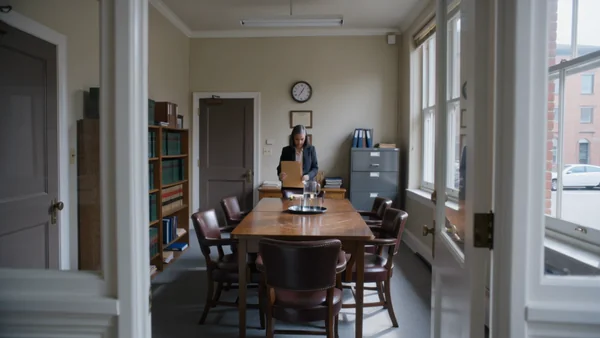
One slow move through your meeting room with quiet room tone, for the homepage and your LinkedIn page.
AI photos and videos for professional services
Office films, explainer posts and team photos for law, insurance and accounting firms.
Lawyers
Clients look you up before they call. Give them a calm view of the office, plain guides to what happens next and portraits for your articles, made in an afternoon instead of a photo shoot.
Insurance agents
People think about cover a few times a year. Stay in their feed between renewals with home safety reminders, friendly office scenes and review prompts, without selling a policy in every post.
A vertical clip of a simple home check, like testing a smoke alarm, with real household sound.

An agent and two clients around a table, for your website, newsletter or local listings.
A post with a headline and a short second line inviting clients to book their yearly review.
Accountants
Your busiest weeks are the worst time to make content. Prepare year end reminders, desk clips and team scenes in a quiet month, then post them when clients start asking questions.
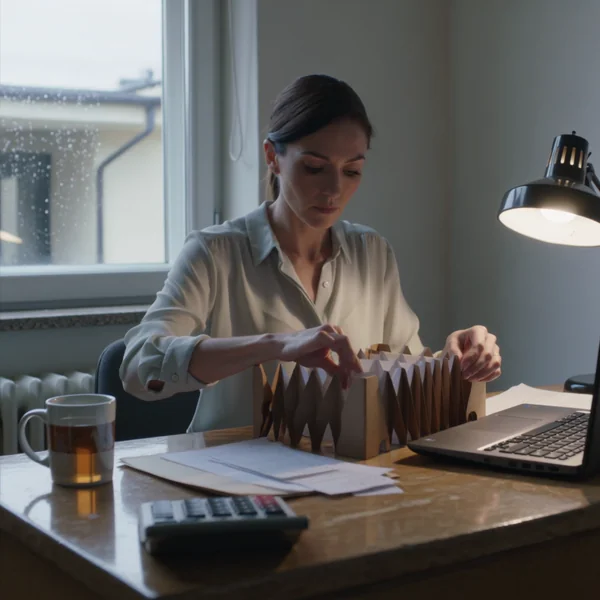
A square clip of receipts being filed on a rainy morning, for feed posts during filing season.
Two colleagues talking over a printed sheet, for a blog header or a careers post.

A carousel cover with a clear headline, followed by slides carrying your own checklist points.
Why it works for professional services
Room tone, or silence for your own voice
Kling 3.0 clips run from 3 to 15 seconds, wide, vertical or square. Sound is a switch: keep the ticking clock and street noise, or render a silent clip and lay a partner's recorded voice over it in your editor.
Quoted words come out as written
Put each line in quotes and GPT Image 2.5 prints those exact words, so a headline and a second reminder line sit cleanly above the photo. Keep both short and proofread once before posting.

Your office, not a stock one
GPT Image 2.5 takes up to 16 reference photos, so your real office and furniture can steer the scene. It renders 1K, 2K or 4K in 13 ratios but not 4:5: make a feed image at 3:4 and crop it.

How it works
- 1

Add your photos
Optional. Upload a room, a dish or a car so the result matches your real place.
- 2
Write the prompt
Describe the shot the way you would to a photographer, or start from an example on this page.
- 3

Generate and post
Download the image or video and post it wherever your guests and customers look.
Pick a plan
One credit balance covers images, video and audio. Pick the size that fits how much you make.
Most popular
Studio Pro
Studio value with extra headroom.
49 €month
6,400credits / month
Team seats

2 seats included
What you'll generate
- Images~1,600
- Songs~492
- Videos~640
- Separations~1,066
- Caption Minutes~213
- All modelsIncluded
Starter
Low tier generations for regular use.
10 €month
1,100credits / month
What you'll generate
- Images~275
- Songs~84
- Videos~110
- Separations~183
- Caption Minutes~36
- All modelsIncluded
Pro
Access full experience.
20 €month
2,600credits / month
What you'll generate
- Images~650
- Songs~200
- Videos~260
- Separations~433
- Caption Minutes~86
- All modelsIncluded
Powerhouse
Most cost efficient.
99 €month
13,000credits / month
13,000 credits/mo
Team seats
3 seats
Extra seats €19/seat/mo
What you'll generate
- Images~3,250
- Songs~1,000
- Videos~1,300
- Separations~2,166
- Caption Minutes~433
- All modelsIncluded
Enterprise
For teams that outgrow standard plans.
Custom
Pricing tailored to your team
What's included
- Custom number of seats
- Custom credit volume
- Invoice billing
- Priority support
Starter
Low tier generations for regular use.
10 €month
1,100credits / month
What you'll generate
- Images~275
- Songs~84
- Videos~110
- Separations~183
- Caption Minutes~36
- All modelsIncluded
Pro
Access full experience.
20 €month
2,600credits / month
What you'll generate
- Images~650
- Songs~200
- Videos~260
- Separations~433
- Caption Minutes~86
- All modelsIncluded
Most popular
Studio Pro
Studio value with extra headroom.
49 €month
6,400credits / month
Team seats
2 seats included
What you'll generate
- Images~1,600
- Songs~492
- Videos~640
- Separations~1,066
- Caption Minutes~213
- All modelsIncluded
Powerhouse
Most cost efficient.
99 €month
13,000credits / month
13,000 credits/mo
Team seats
3 seats
Extra seats €19/seat/mo
What you'll generate
- Images~3,250
- Songs~1,000
- Videos~1,300
- Separations~2,166
- Caption Minutes~433
- All modelsIncluded
Enterprise
For teams that outgrow standard plans.
Custom
Pricing tailored to your team
What's included
- Custom number of seats
- Custom credit volume
- Invoice billing
- Priority support
Or pay-as-you-go
Test any model with one-time credit packs
Credits never expire and don't require a subscription — buy a pack, generate, see if Kubeez fits.
Quick refill
Quick refill for short bursts of generation.
Credits
500
You pay
€6
Standard pack
Mid-size pack at the standard per-credit rate.
Credits
1,500
You pay
€18
−5%
Volume pack
Larger pack with a volume discount built in.
Credits
5,000
You pay
€60€57
−10%
Production pack
Best per-credit price for sustained production.
Credits
15,000
You pay
€180€162
Questions
No. It makes the images and video. Every claim and piece of advice in a post comes from you, so check the wording against your own professional rules before publishing.
No. Each one was generated from a written prompt. Use invented people for explainers and office scenes, and real photos of your actual staff on your team page.
Yes. Attach photos of your reception, meeting room or shopfront as references, and GPT Image 2.5 builds the scene around them. Up to 16 photos per render.
Do not ask a model to draw it, because it will invent something close but wrong. Download the image and place your real logo file in your design tool.
Wide 16:9 video for your website and LinkedIn, vertical 9:16 clips for reels and stories, and tall 3:4 stills you can crop to 4:5 for a feed.
Start from one of these workflows
Open one in the studio and swap in your own place, products and offer.