Tutorials
AI Animation Generator: How to Make Cartoon Videos
Use an AI animation generator to make cartoon, anime, 3D and clay videos without drawing. Lock one character, add voices, fix drift and copy 5 prompts.
· Dex
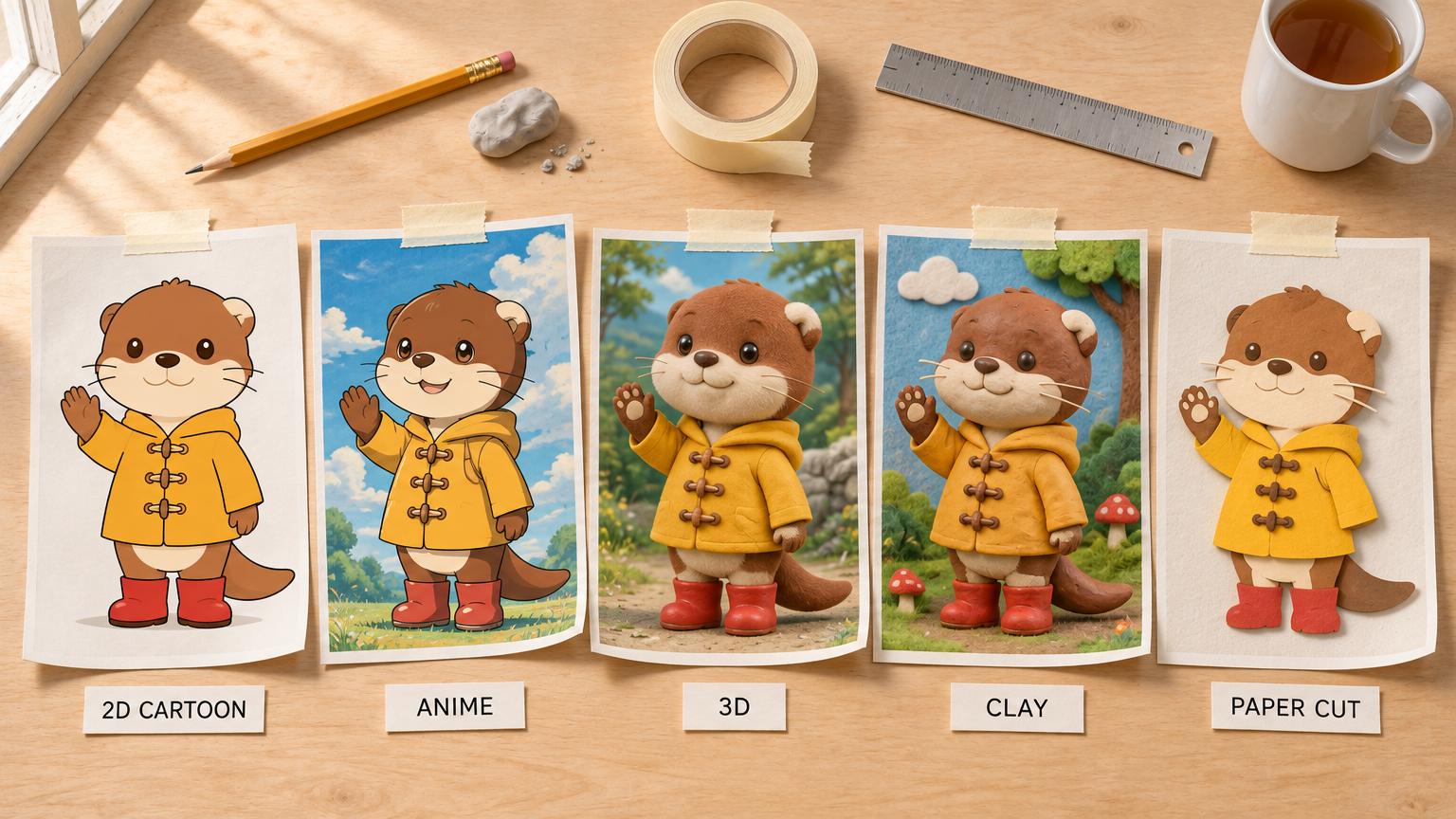
An AI animation generator turns a written prompt or a still drawing into a short animated clip, so you can make a cartoon short, a kids story video or an animated explainer without drawing a single frame. The workflow that holds up is simple: pick one animation look, make a reference sheet of your character, generate each shot from that sheet, then add voice and sound. Below is how to make AI animation videos step by step, with five prompts to copy and fixes for the usual problems.
What an AI animation generator actually makes
Today's video models make shots, not episodes. One generation gives you a single clip, usually somewhere between 4 and 30 seconds depending on the model. A two minute story is a sequence of those shots, cut together in an editor, with narration and music on top.
So plan in shots. Before any prompt, write a shot list: one line per shot with who is in it, what they do and where the camera is. It also shows which shots need the character to look identical.
If you only want to bring one existing image to life with a camera move, the earlier guide on image to video animation covers camera moves and start and end frames. This post is about making a whole animated piece with a recurring character.
The animation looks that work well
The look comes from your prompt and your reference image, not from a special "anime model". What matters is describing the medium clearly and keeping it identical across shots.
- 2D cartoon. Clean lineart, flat colour, one shadow tone. The easiest look to keep consistent, the natural choice for kids stories and explainers, and what most people want from an AI cartoon generator. Write "clean 2D cartoon, confident even lineart, flat cel colour".
- Anime. Hand-drawn TV anime look with sharp lineart, cel shading and painted backgrounds. Strong for dramatic moments, rain, city lights and speed. Describe the look in plain words instead of naming a studio or a show.
- Stylized 3D. Soft matte materials, rounded readable shapes, gently exaggerated proportions. Holds up well in motion and in camera moves around a character. Say "stylized 3D animated feature look, not photoreal".
- Clay and stop motion. Handmade clay figures with fingerprints and tool marks on a tabletop set. Ask for "stepped stop motion movement" or the model will animate it as smoothly as 3D, which reads wrong.
- Paper cut-out. Layered paper shapes with visible edges and soft drop shadows. Ideal for explainers, because simple shapes rarely break and diagrams read clearly.
Pick one and keep it for the whole video.
Step 1: Lock one style and one character with a reference sheet
The single biggest quality jump comes from making a character turnaround sheet before you generate any video. It is one image of your character from the front, three-quarter, side and back on a plain backdrop, and every later shot is built from it.
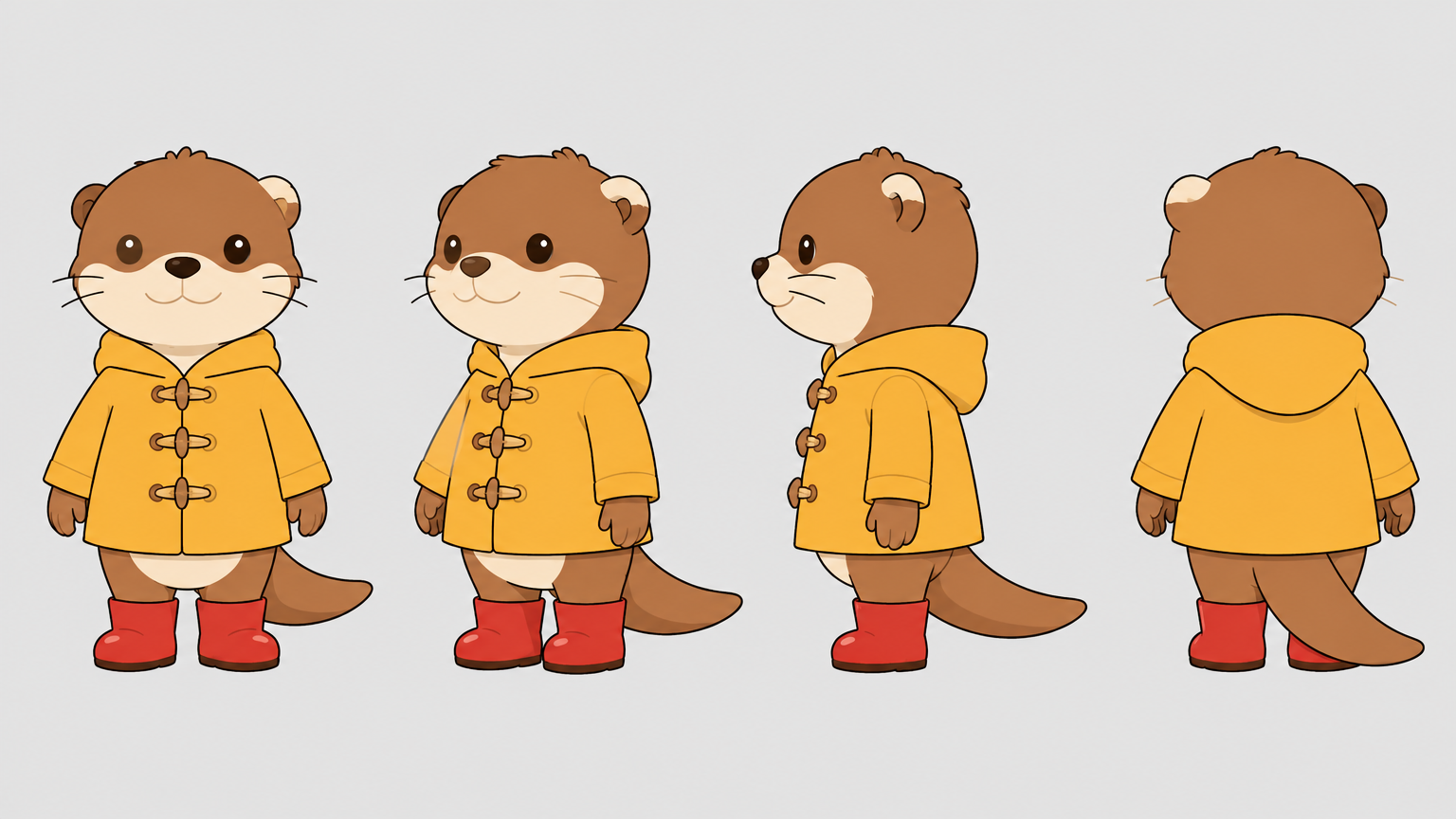
We made the sheet above in the AI image generator for an invented character, Pip the otter. Three rules made it work:
- Say the medium early. The second sentence of the prompt was "Clean 2D animation model sheet, confident even lineart, flat cel colour with one shadow tone, drawn, not photoreal." Models weigh the start of a prompt most.
- Describe the character like a costume list. Fur colours, the cream patch on one ear (with the side named), the raincoat with wooden toggles, the red boots. Specific details give the model something to hold on to in every shot.
- Keep photo words out. "Pores", "skin texture", "lens", "bokeh" and "catchlights" pull a cartoon toward a photograph. End a stylized prompt with a line like "not a photograph, not a 3D render, lineart and flat colour only".
Our first version came back with one eye drawn wrong in the front view. Instead of starting over, we ran a targeted edit with the sheet attached: "redraw that one eye to match the other, change nothing else". One wrong detail is an edit, not a re-roll.
For a kids story, animal and creature characters are the easy route. They read well at small sizes, they are forgiving in motion, and you avoid the uncanny look that semi-realistic children get.
Step 2: AI animation from an image, or from text
You have three ways to turn the sheet (or any drawing) into motion. They behave differently, so choose per shot.
Your image is the first frame. In image to video, the picture you upload becomes the opening frame and the model animates forward from it. Use this when you already have finished art: a scene you drew, a book illustration you own, or a single still you generated and love. The first frame stays exactly as drawn; everything after it is new.
Your image is a reference. Attach the sheet as a reference and describe a completely new scene. The model redraws the whole frame but keeps the character's design. This is the route for multi-shot stories, because Pip can walk into a kitchen, a forest and a bus stop while still being the same otter.
Text only. Fastest for one-off shots and backgrounds, such as an establishing shot of a rainy town. Without a reference the character will drift from shot to shot, so keep text-only generations for shots where your hero does not appear.
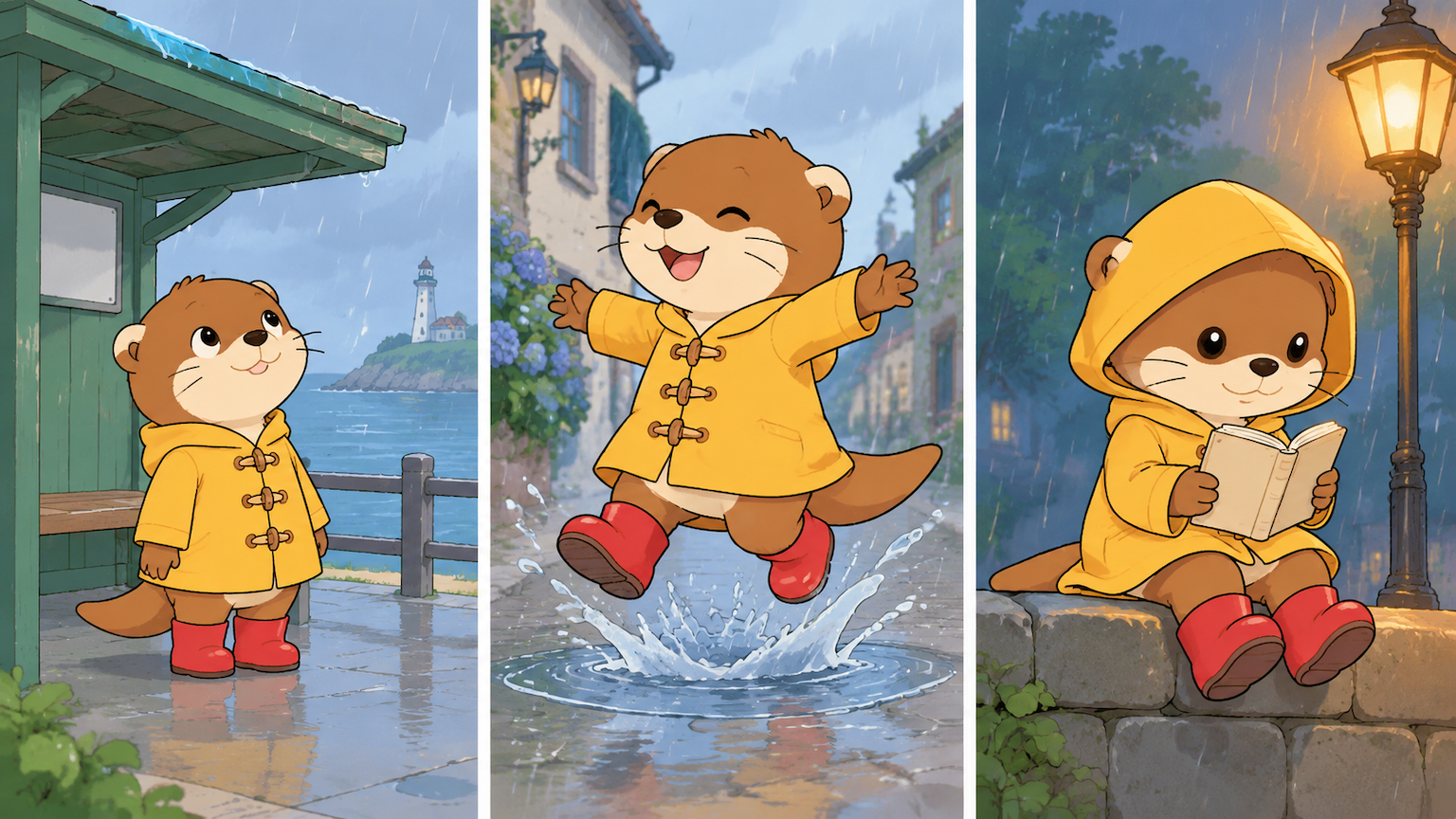
All three frames came from the same sheet, and the coat, boots and ear patch survive every scene change.
Which model suits which job
All of these live in the AI video generator. Pick by what the shot needs, not by style:
| What the shot needs | Model on Kubeez | Why |
|---|---|---|
| A long single take, or many reference images at once | Seedance 2.5 | 4 to 30 second clips, up to 30 reference images, first frame or first and last frame, sound on by default |
| Named recurring characters you mention in the prompt | Kling 4.0 | Up to 7 elements (2 to 4 stills each) called by name in the prompt, optional bound voices, 3 to 30 seconds |
| Long shots from references on a smaller budget | Wan 3.0 | 2 to 30 seconds, up to 10 reference images, lower per-second rate than Seedance 2.5 at the same resolution right now |
| Bring one finished drawing to life | Grok Imagine Video 1.5 | Takes exactly one start image, 2 to 15 seconds, audio included |
| A character copying a dance or gesture from a clip you filmed or have the rights to | Kling 3.0 Motion Control | Moves your character still with the motion of a reference video |
Prices change and most video models bill by the second, so check the cost on the model card before a long render. Draft short, then render the length you need once the shot works.
Step 3: Add voices, sound and music
Animation without sound feels unfinished. There are three practical ways to add it.
- Speech written in the prompt. Seedance 2.5 can generate spoken lines from the prompt with sound on. Put the exact line in quotes and say who speaks it: Pip says, "I think the puddle is deeper than it looks." Keep each line short.
- A bound voice per character. Kling 4.0 lets you attach a short voice sample to a character element, so the same voice comes back across shots.
- A separate voiceover. For a narrated kids story or an explainer, write the narration as one script and generate it with AI text to speech. Then lay it under the shots in your editor. This keeps one consistent narrator across the whole video, no matter how many clips you generate.
Be realistic about lip sync on cartoon mouths: it is the least reliable part of AI animation today. Short speaking shots, a wider frame or narration over action hide it well.
Five AI animation prompts you can copy
Each prompt names the medium, the subject and action, the camera, the light and the sound, and ends with a clean-up line. Attach your reference sheet for any shot with a recurring character.
1. 2D cartoon kids story (attach your character sheet)
Horizontal shot, one continuous take, no cuts. Clean 2D cartoon, confident even lineart, flat cel colour with one shadow tone. Pip, the small chestnut brown otter from the reference in his mustard yellow raincoat and red rubber boots, runs along a wet cobbled lane in a sleepy seaside town and jumps with both feet into a big puddle, sending up a splash shaped like a crown. The camera stays low at puddle height and tracks sideways with him. Soft overcast afternoon light, wet stones shining. Sound of light rain, rubber boots slapping and one big splash, then Pip laughing. Same character design in every frame. No watermark, no signature, no stray text, no invented logos.
2. Anime action moment
Horizontal shot, one continuous take. Hand-drawn TV anime look, sharp lineart, cel shading, painted background. An adult bicycle courier in her twenties with a short black bob and a green rain jacket races through a crowded neon-lit street at night in heavy rain, standing on the pedals as she weaves between umbrellas. The camera follows close behind her, then swings to her side as she passes a glowing noodle stall. Wet street reflecting pink and teal shop lights. Sound of rain, a bicycle bell and a busy street. Shop signs show simple shapes only, no readable words. No watermark, no signature, no stray text, no invented logos.
3. Stylized 3D short
Horizontal shot, one continuous take. Stylized 3D animated feature look, soft matte materials, rounded readable shapes, not photoreal. A plump hedgehog baker in a flour-dusted blue apron pulls a tray of round loaves out of a brick oven in a tiny wooden bakery at dawn, then sniffs them with a proud little nod. The camera slowly pushes in from the doorway to his face. Warm orange oven glow from the right, cool blue dawn light through the window on the left. Sound of a crackling oven, a wooden tray scraping and birds outside. Four fingers per paw, no extra limbs. No watermark, no signature, no stray text, no invented logos.
4. Clay stop motion
Horizontal shot, locked camera on a tabletop set. Handmade clay stop motion, visible fingerprints and tool marks, felt and cardboard props, stepped stop motion movement at a low frame rate, not smooth. A small clay snail wearing a tiny red postbag slides along a garden wall made of clay bricks and drops a letter into a matchbox mailbox. Soft single softbox light from above left, gentle shadows on the bricks. Sound of soft squelching, a tiny paper rustle and a little bell. No watermark, no signature, no stray text, no invented logos.
5. Paper cut-out explainer
Vertical shot for a short explainer, one continuous take. Layered paper cut-out animation, visible paper edges and grain, soft drop shadows between layers, flat craft colours. A paper seed sits in brown paper soil, then a pale green shoot pushes up, two leaves unfold and a yellow paper sun slides in from the top corner. The camera slowly rises with the plant. Even soft light like a craft table lit from above. Sound of soft paper rustles and a gentle music box melody. No words on screen, no watermark, no signature, no stray text, no invented logos.
Fixing the usual failure modes
The style drifts between shots. Copy the medium sentence word for word into every prompt, attach the same sheet every time, and keep the lighting description consistent. Changing "flat cel colour" to "colourful cartoon" in one prompt is enough to change the look.
The character changes outfit or colour. Name the details that matter in every prompt (the yellow raincoat, the red boots, the cream ear patch), and keep only one reference sheet per character. Two slightly different references average into a third design.
Hands and paws break. Give characters simple hands: mittens, paws or four fingers. Ask for "four fingers per paw, no extra limbs", avoid close-ups of hands holding small objects, and keep fast hand movement out of the shot.
Text on screen comes out as gibberish. Video models are weak at readable signs and labels. Ask for "simple shapes only, no readable words" on signs and add titles, captions and labels in your editor afterwards.
Motion feels floaty or muddled. Describe one clear action per shot; three actions in eight seconds turn into mush. For clay, add "stepped movement at a low frame rate".
Making AI animation for YouTube
Plan for the format before you generate. Use 16:9 for regular videos and 9:16 for Shorts, and pick the aspect ratio in the generator rather than cropping later, because a crop can cut your character's head off. Write the narration first and time five to ten second shots to it. Check the platform's current rules on labeling AI content before you publish.
FAQ
Can I make a cartoon video with AI if I can't draw?
Yes. Describe your character in words, generate a reference sheet with an image model, then use that sheet as the reference for each video shot. You never draw a line, but you do make the creative decisions: the look, the character, the shot list.
Can AI animate my own drawing?
Yes. Upload the drawing in image to video and it becomes the first frame of the clip. The model keeps your drawing as the opening frame and animates from there. A clean scan with strong lines works better than a photo of paper at an angle.
How long can an AI animated video be?
A single shot is limited by the model: up to 30 seconds on Seedance 2.5, Kling 4.0 and Wan 3.0, shorter on others. Longer videos are made by generating several shots with the same character reference and editing them together.
What is the best AI anime video generator?
There is no single anime model. The anime look comes from how you describe the medium and from your reference image. On Kubeez, Seedance 2.5 is a strong pick for long takes with many references, and Kling 4.0 for scenes with named recurring characters.
Is there a free AI animation generator on Kubeez?
You need an account to generate. New accounts get a one-time grant of welcome credits to try the tools, and after that you need paid credits to keep generating. There is no permanent free tier.
Dex writes the Kubeez guides and makes every example with the same tools you use.